Prompt Suggestions
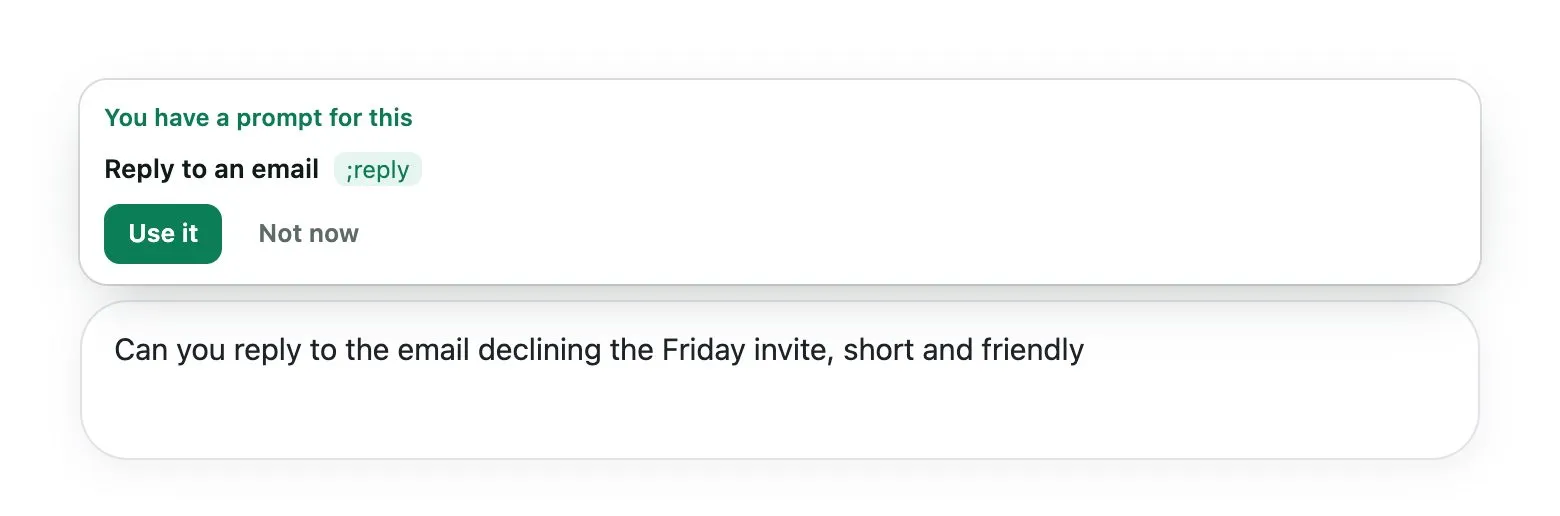
Prompt suggestions let Kortex notice when you already saved a prompt for what you are typing. A box appears above the chat box on AI sites and offers it. Click Use it to swap your message for the saved prompt.
Why use suggestions?
You may forget that you saved a prompt. A friendly nudge saves you the typing, and your best wording gets used.
How do suggestions work?
- You start typing in a chat box on an AI site.
- If your words mean the same as a saved prompt, a box appears above the chat box. It says You have a prompt for this.
- Click Use it to swap your message for the saved prompt. If it has blanks, the fill-in form opens first.
- Or click Not now. The offer stays hidden for the rest of that page.
How do I turn it off?
Open the side panel's Chats tab and its settings sheet, Saving your chats. Switch off Suggest my saved prompts while I type.
Good to know
- You need at least one saved prompt for it to have anything to offer.
Related: Prompt shortcuts, Suggestions in the Library.