Podcasts
Turn the Audio Overviews you generate in Gemini Notebook into a private podcast feed you can listen to in Spotify, Apple Podcasts, or any podcast app.
Read this first: who makes the audio?
Gemini Notebook generates the audio. Kortex does not. This is the single most common point of confusion, so it is worth being precise:
- Gemini Notebook creates the Audio Overview. You do this inside your notebook, using Google's own feature. Kortex has no text-to-speech of its own and never creates audio.
- Kortex takes an Audio Overview you have already generated and puts it into a podcast feed — so you can listen outside the browser, on your phone, in the app you already use.
If you have not generated an Audio Overview in Gemini Notebook yet, there is nothing for Kortex to add to a podcast. That is the starting point, not Kortex.
Do I need a paid Gemini Notebook plan?
Kortex does not require one. We never check what Gemini Notebook plan you are on.
Generation runs on your own Gemini Notebook account, using its quota. So whatever Gemini Notebook lets your account do is what you get here. Gemini Notebook enforces a daily Audio Overview limit; if you hit it, generation fails and Kortex reports that the daily limit was reached. That cap is Google's, not ours — check Gemini Notebook for the current numbers.
Short version: if Gemini Notebook lets you make the audio, Kortex can turn it into a podcast.
How to create a podcast
- Generate an Audio Overview in Gemini Notebook. Open your notebook, use Gemini Notebook's Audio Overview feature, and wait for it to finish.
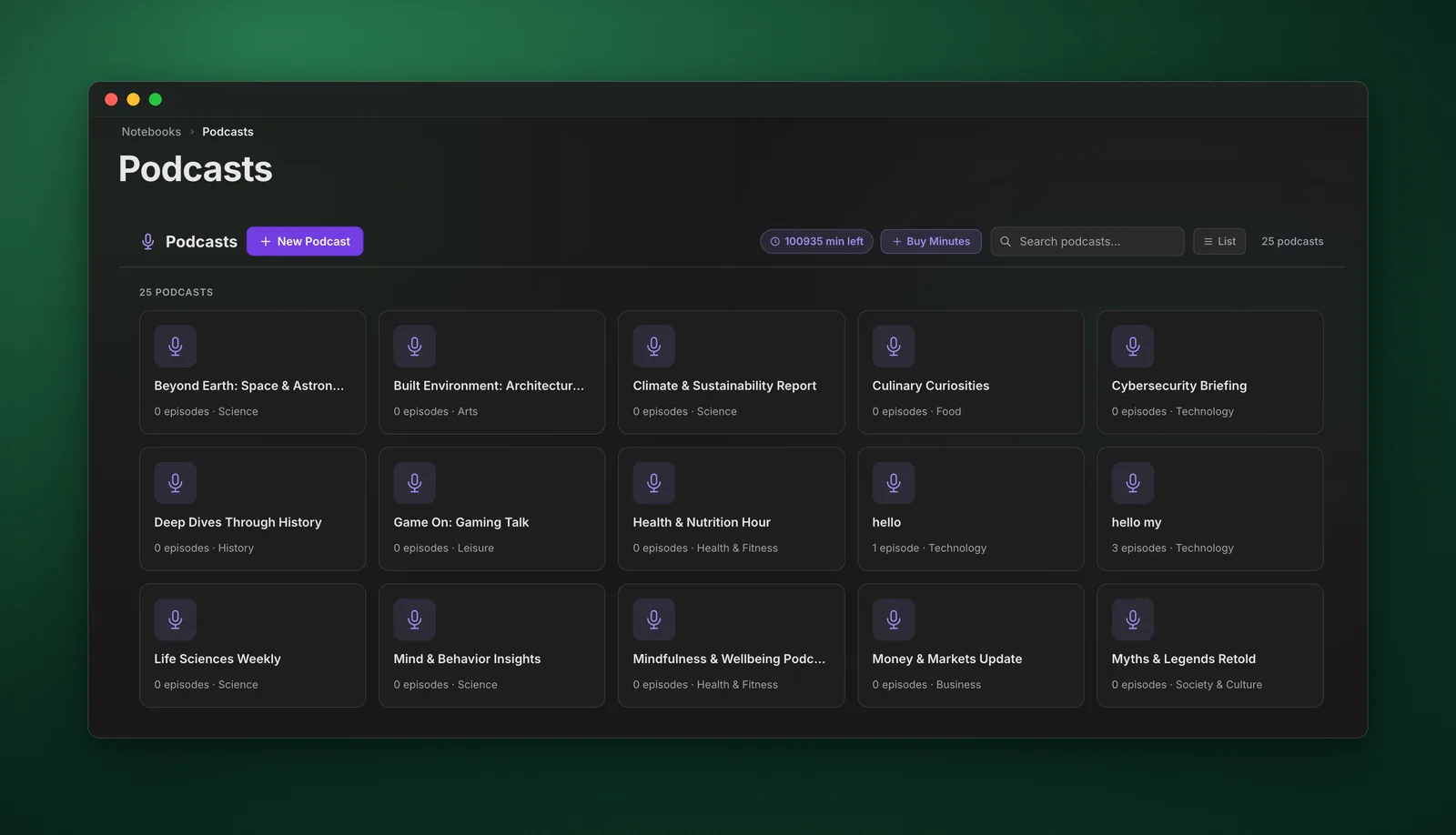
- Open the Podcasts page in the Kortex dashboard sidebar.
- Create a podcast. Think of it as a playlist or a show — you can have several (for example, one per subject or project).
- Add the audio to it. Pick the Audio Overview from the notebook you generated it in. This is the step that uses minutes — see below.
- Copy the RSS link for that podcast.
- Paste it into your podcast app. Every app has an "add show by URL" option. From then on, anything you add to that podcast appears in the app automatically.
Podcast minutes explained
Minutes are what let Kortex host your audio so a podcast app can fetch it.
What uses minutes
- Adding an episode to a podcast — this is the only thing that spends minutes.
- You are charged for the length of that episode, rounded up to the next whole minute. A 12 minute 10 second overview costs 13 minutes.
- Each episode is charged once. Re-adding or retrying the same episode will not charge you twice.
What does not use minutes
- Generating the Audio Overview in Gemini Notebook — that runs on Google's quota, not ours.
- Listening, in the dashboard or in your podcast app — unlimited, however often you replay.
- Downloading an episode.
Getting minutes back
Removing an episode from a podcast refunds its minutes. If you add something by mistake, or clear out an old episode, the balance returns. Minutes are a pool you reuse, not a meter that only counts up.
Checking your balance
Open Podcasts in the dashboard sidebar. In the toolbar at the top you will see a "{n} min left" pill, next to a Buy Minutes button. There is nothing to enable — it is on the page.
It updates as you add and remove episodes, without reloading. It turns red when you drop below 60 minutes, as a heads-up that you are running low.
How many you get
- Podcasts are a paid feature — Pro or Pro Yearly. The free Basic plan does not include them.
- Upgrading grants 1,000 minutes — roughly 60 to 90 typical Audio Overviews. AppSumo Lifetime tiers grant more, depending on the tier you bought.
- This is a one-time balance, not a monthly allowance. It does not expire and it does not refill on renewal. Because removing episodes refunds minutes, most people never exhaust it.
- If you do run low, you can top up — 500 additional minutes for $10.
If you run out
Kortex checks before it starts. For a file you upload it knows the length up front and stops immediately; for a Gemini Notebook overview the length is not knowable in advance, so it can only stop you when your balance is already at zero.
If the finished audio turns out longer than your remaining balance, the episode is removed from the podcast rather than left stuck part-added, and you are told how many minutes it needed. Nothing already in your feeds is touched. Free up minutes by removing episodes you have finished with, or use Buy Minutes on the Podcasts page.
Listening in Spotify and other apps
Each podcast has its own RSS link. On the podcast, click Podcast RSS — the link is copied to your clipboard. Then paste it into any app that accepts a feed URL:
- Spotify — Settings, then "Add a podcast by URL"
- Apple Podcasts — Library, then "Follow a Show by URL"
- Pocket Casts, Overcast, and most others — look for "add by URL" or "add custom feed"
Once added, new episodes show up on their own. You do not need to re-paste the link.
The exact wording differs between apps, and some change where the option lives. If you cannot find it, search that app's help for "add podcast by URL" — the feature is standard, even when it is buried.
New to RSS or want detailed, click-by-click steps for each app? See What Is RSS? (And How to Use Your Podcast Feed).
Treat your RSS link as private. It contains a long random token so it cannot be guessed, but it is a secret link, not a login — podcast apps cannot sign in. Anyone you send it to can listen to that podcast. Note that the feed also contains your account email address, in the owner field that podcast apps expect. Share the link only with people you would give both to.
Uploading your own audio
Podcasts are not limited to Gemini Notebook overviews. Use Upload on a podcast to add your own files — lecture recordings, interviews, voice memos — mixed in with your generated episodes.
Common formats work, including MP3, M4A, WAV, AAC, OGG, and WebM. Uploaded audio is charged the same way, by length.
Large files are compressed automatically before upload, so an uncompressed recording will not stall. This affects file size only — the duration, and therefore the minutes charged, is unchanged.
Re-uploading a file you have already added reuses the existing episode and is not charged again.
Podcast artwork
You can set cover art per podcast; it is what shows up in your podcast app. Images are resized and compressed for you, and artwork never costs minutes — minutes apply to audio only.
Listening in the dashboard
- Speed control - 0.5x to 2x
- Skip - 15 seconds forward or back
- Resume - picks up where you stopped
- Queue - line up several episodes
Automating it
If you do this often, two automation rules remove the manual steps (paid plans):
- The Generator - triggers Gemini Notebook's Audio Overview generation when a notebook matches a rule you set
- Podcast Curator - files new audio into the right podcast automatically, based on tags
Together these mean a tagged notebook can become an episode in your phone's podcast app without you touching the dashboard.
Common questions
Where is the Podcasts page? Podcasts require a paid plan — Pro or Pro Yearly. On the free Basic plan the page shows an upgrade prompt instead.
Why is my podcast empty? No Audio Overview has been added yet. Generate one in Gemini Notebook first, then add it here.
Can Kortex generate the audio for me? No. Gemini Notebook generates it; Kortex distributes it. The Generator automation can trigger Gemini Notebook's generation for you, but the audio is still made by Gemini Notebook.
Do minutes reset every month? No. It is a one-time balance that does not expire. Removing episodes refunds minutes.
My episode is not showing in Spotify. Podcast apps cache feeds and refresh on their own schedule — usually within a few hours. Pull to refresh in the app. Confirm the episode appears in the Kortex dashboard first; if it is not there, it was not added.
Can I have more than one podcast? Yes, as many as you like, each with its own RSS link. Most people keep one per subject.