Export Notes and Artifacts
Export AI-generated notes, study guides, quizzes, briefings, and other artifacts from your NotebookLM notebooks.
If you haven't installed the extension in your browser, please install it first.
How it works
- Navigate to your NotebookLM notebook
- Click the export button in the studio panel (appears in the notes list header)
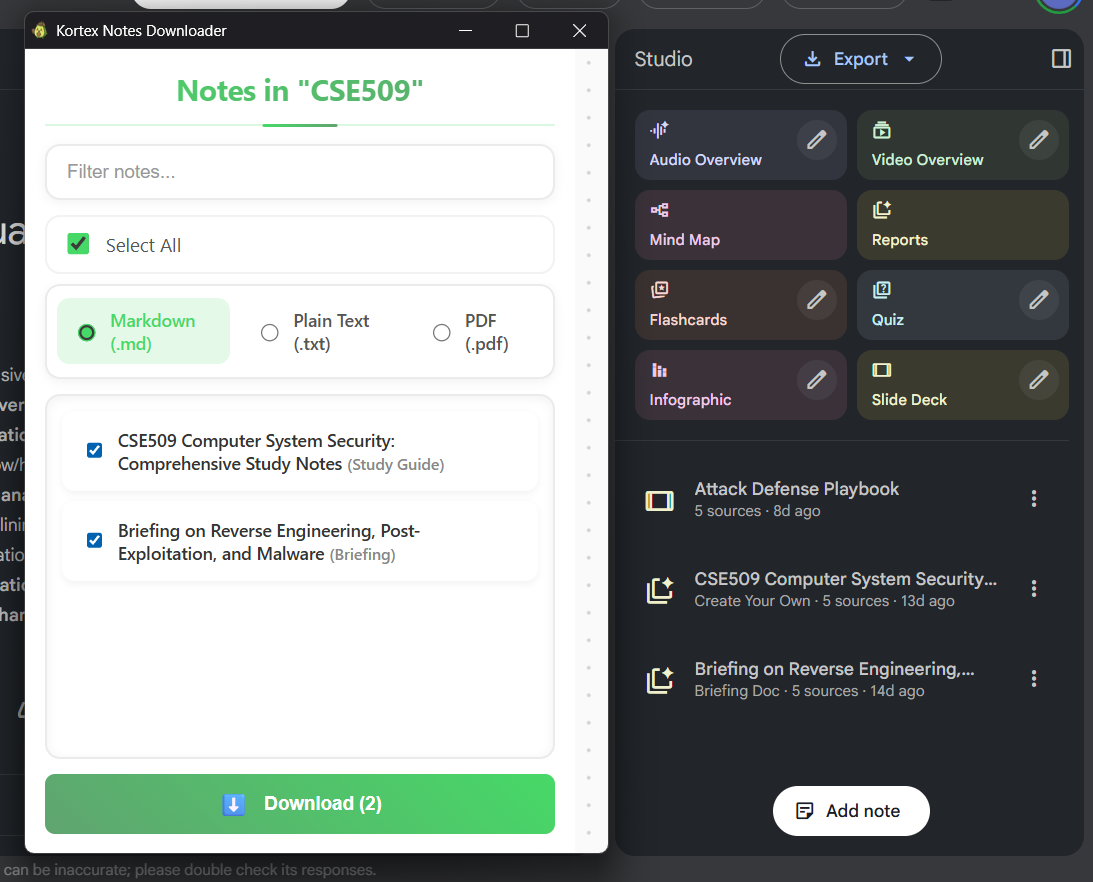
- A popup will open showing all available notes and artifacts
- Select which notes to export using checkboxes
- Choose your preferred format (Markdown, Text, or PDF)
- Click "Download" - your files will be saved to your Downloads folder
Supported Note Types
- Notes: Standard AI-generated notes
- Study Guides: Comprehensive study materials
- Quizzes: Interactive quiz content
- Briefings: Summary briefings
- FAQs: Frequently asked questions
- Timelines: Chronological content
Supported Formats
- Markdown (.md): Intelligently formatted markdown with proper hierarchy (headings, lists, paragraphs)
- Text (.txt): Plain text format for maximum compatibility
- PDF (.pdf): Professional PDF documents with formatted content
Export Limits
Notes export uses the same limits as source exports:
- Basic: 15 exports per month (free)
- Lite: 80 exports per month ($3.99/month)
- Pro: Unlimited exports ($6.99/month)
Note: Export limits are shared between source exports and notes exports. Export limits reset monthly for Basic and Lite tiers. If you are on credit system, each export costs 10 credits from your account balance.