
How to import a Reddit post into NotebookLM (Gemini Notebook)

1 minute 5 steps Updated

Quick answer

Install the Kortex extension and sign in. Open the Reddit post, click the NotebookLM button in the post's action row, and choose a notebook. Kortex saves the post's title, author and text as a source.

Watch it first

How to import a Reddit post into NotebookLM (Gemini Notebook)
Read the transcript

Here's how to save a Reddit post to Gemini Notebook, formerly NotebookLM, with the Kortex extension. Open the post itself, not the subreddit list. Kortex adds a NotebookLM button to the post's action row.

Click it. Choose Create New Notebook for a new notebook, or Use Existing Notebook to add the post to research you already have. Your notebooks show in a list with a search box.

Kortex marks the best match as Suggested. If the notebook already has this post, Kortex warns you. Cancel, or add it anyway.

Open the notebook. The post is a source with its title, author and text. Kortex doesn't save the comments, so ask about the post itself.

To import more posts, repeat the same steps on each one. Find the full steps and fixes on the Kortex website.
  1. Open the Reddit post

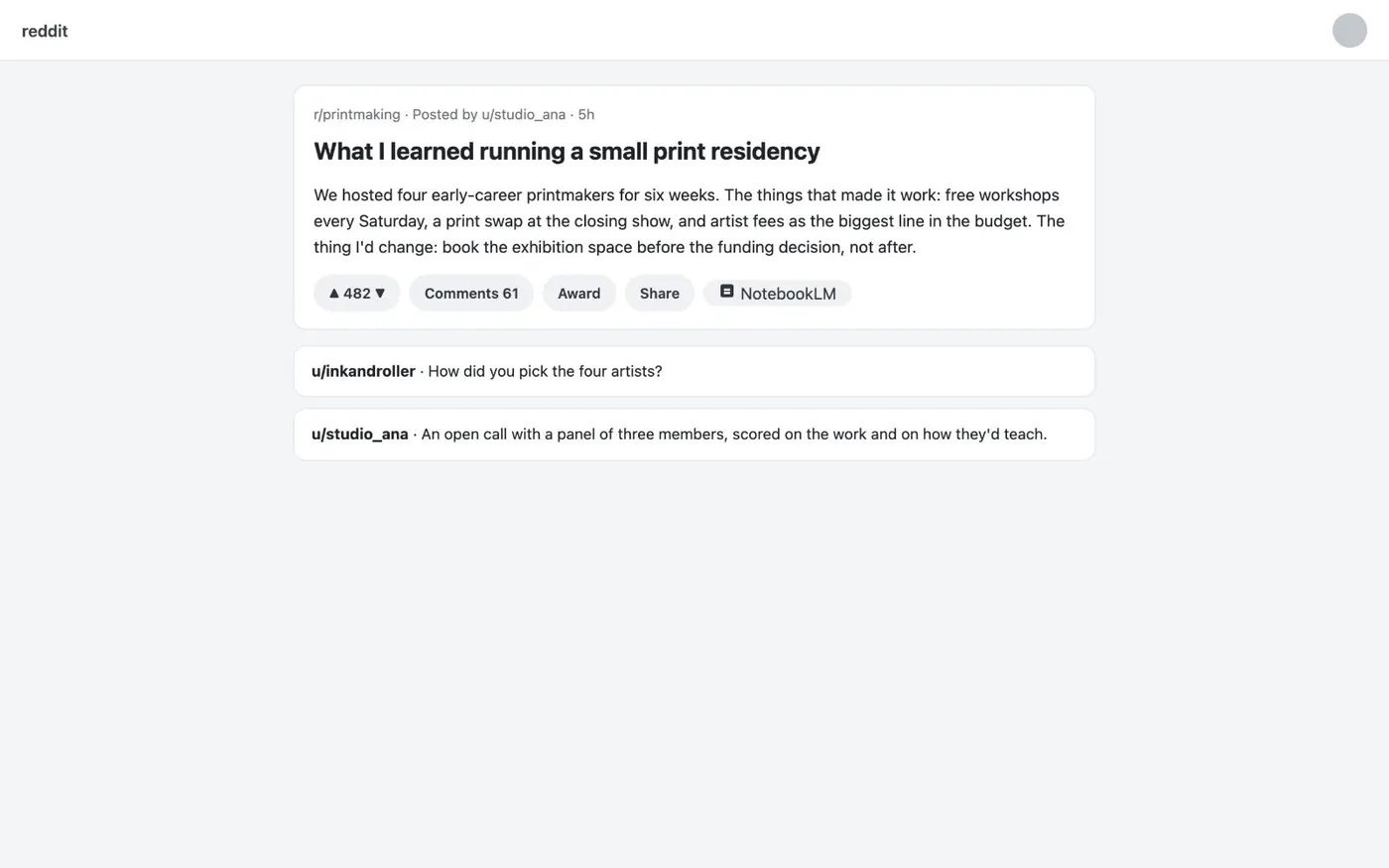
    Go to the post itself, not the subreddit list. With Kortex installed, a NotebookLM button appears in the post's action row.

    A Reddit post about running a print residency, with a NotebookLM button in the post's action row under the text.
    On Reddit, a Kortex button sits in the post’s action row.
  2. Click the NotebookLM button

    Kortex opens a menu with Create New Notebook and Use Existing Notebook. Choose the first for a new notebook. Choose the second to add the post to research you already have.

  3. Pick the notebook

    Your notebooks show in a list with a search box. Kortex marks the best match as Suggested. It warns you if the notebook already has this post.

  4. Check the source in Gemini Notebook

    Open the notebook. The post is a source with its title, author and text. Kortex does not save the comments, so ask Gemini Notebook about the post itself.

  5. Import more posts the same way

    Repeat the same steps on each post you want to add to the notebook.

If it doesn’t work

The NotebookLM button is not on the Reddit post
Open the post's own page and reload it once. If the button is still missing, open the Kortex side panel and check Manage features. The button may be switched off for this site.
The post is already in the notebook
Kortex warns you before it adds the same post twice. Cancel and open the notebook to use the copy you have. Or choose to add it anyway.
The comments are missing from the source
Kortex saves a Reddit post's title, author and text, not its comments. To keep a comment, select it and use Send highlight to NotebookLM.

Questions people ask

Something we missed? Ask us.

Can I import X and LinkedIn posts the same way?

Yes. X has Archive thread to NotebookLM, which collects the author's own thread. LinkedIn has a button on each feed post. See Import X, Reddit and LinkedIn posts.

Can I import a post into a new notebook?

Yes. Choose Create New Notebook in the menu. The post becomes the first source in it.

Can I import many Reddit links at once?

Not with this button. It saves one post at a time. For a list of links, Bulk import in the Kortex Workspace adds them as web sources.

Keep going

More tutorials

All tutorials

Do it on your own notebooks.

Install the Kortex extension and follow these steps on a notebook you already have.

100,000+ users, rated 4.5 on the Chrome Web Store.

Talk to the Kortex team

This opens a pre-filled email in Gmail. We usually reply within a day.