
How to write a good ChatGPT prompt: 5 simple rules

5 minutes 7 steps Updated

Quick answer

Say the task clearly, give the context ChatGPT needs, and name the tone and style you want. Split a big task into smaller prompts. Then treat it as a conversation and refine the answer with follow-ups. OpenAI says the same: be clear and specific, and work step by step.

Watch it first

How to write a good ChatGPT prompt: 5 simple rules
Read the transcript

Here's how to write a good ChatGPT prompt. Write it the way you'd ask a person for help, and follow five simple rules. Rule one: name the task in one sentence.

Compare: Write about marketing. And: Summarize three marketing trends for a small bakery, in five bullets. Rule two: give the context it can't guess.

Who the reader is, what you already have, and what to avoid. Paste in any text you want worked on. Rule three: set the tone in plain words, like formal, friendly or serious.

OpenAI's example: Explain this in a friendly and engaging tone. Rule four: split a big job into smaller prompts, and say what matters most. You can also ask for a few options to choose from.

Rule five: read the answer, then refine it. Adjust the wording, add context, or simplify the request. OpenAI calls this iterative refinement.

When a prompt works, keep it. Kortex saves prompts with blanks you fill in each time, like audience, in double curly brackets. Then type a semicolon in any AI's chat box, and pick the prompt by its shortcut or title.

Clear, specific, step by step. Full steps and fixes are on our tutorial page.
  1. Treat it like a request to a person

    OpenAI explains that models often do best when you write as if you are sending another human a request. A short order like Do this task for me gives too little to work with. Detailed instructions raise the chance of success.

  2. Name the task clearly

    Say what you want done in one sentence. Compare: Write about marketing, and Summarize three marketing trends for a small bakery, in five bullets. Be specific about what you want.

  3. Give the context ChatGPT needs

    Add the facts it cannot guess: who the reader is, what you already have, what to avoid. OpenAI advises clear prompts with enough context to avoid ambiguity. Paste the text you want worked on.

  4. Set the tone and style

    Use descriptive words such as formal, friendly, professional or serious. OpenAI gives the example: Explain this in a friendly and engaging tone.

  5. Break big jobs into smaller prompts

    If the task is complex, split it into smaller, focused prompts. Say which areas matter most. You can ask ChatGPT for multiple options to choose from.

  6. Refine with follow-ups

    Start with a first prompt, read the answer, then adjust the wording, add context or simplify the request. OpenAI calls this iterative refinement. Keep experimenting.

  7. Optional: save the prompts that work

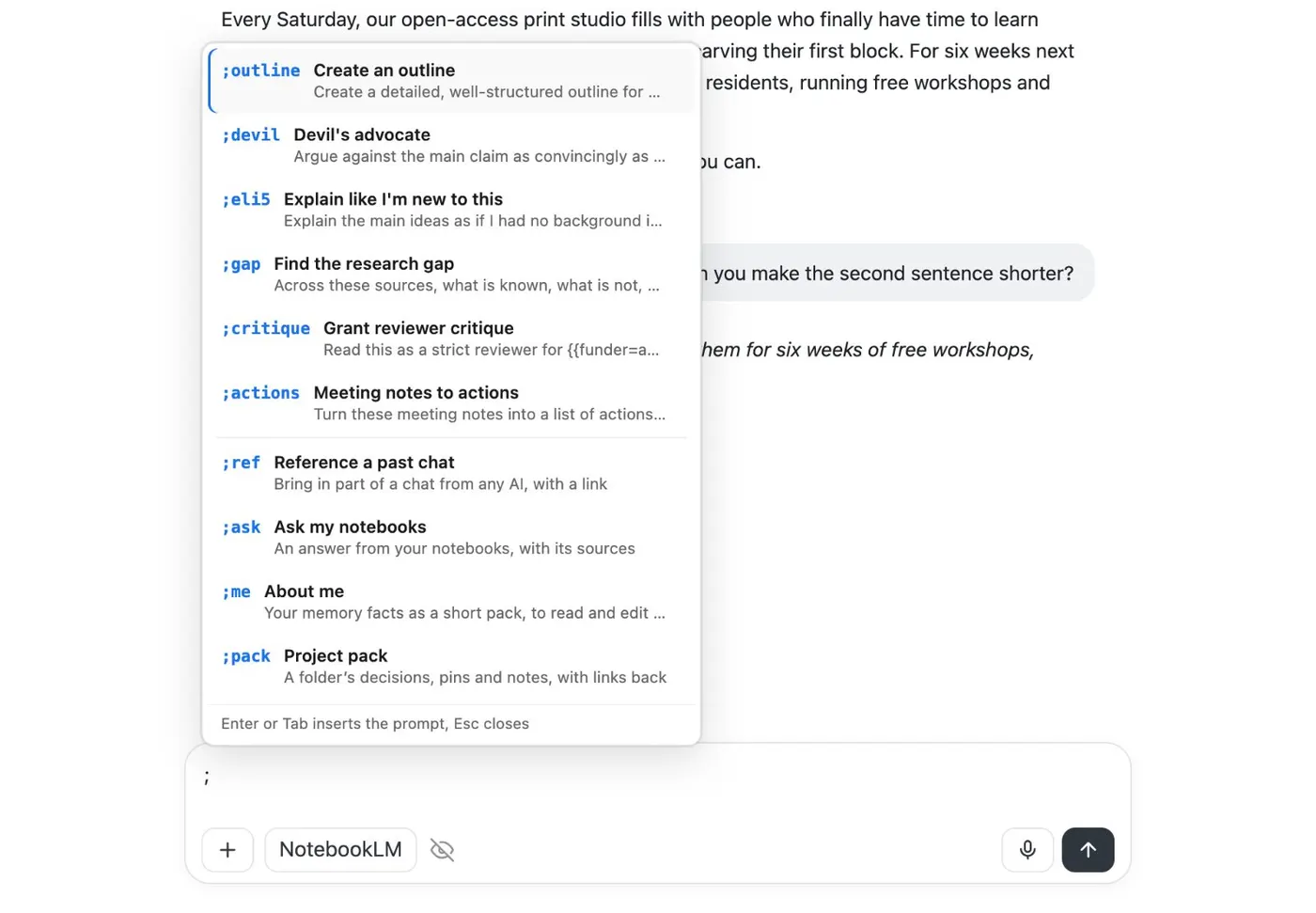
    When a prompt works, keep it. Kortex lets you save prompts with blanks you fill in each time, such as {{audience}}. Then type ; in any AI's chat box and pick the prompt by its shortcut or title.

    A chat box with a semicolon typed and a menu above it listing saved prompts by shortcut, such as outline, devil and eli5, and the commands ref, ask, me and pack.
    Type ; in a chat box for your saved prompts and commands.

If it doesn’t work

The answer is too general
Add detail: who it is for, what you already have and what to focus on. Clear, specific prompts with enough context give more relevant answers.
The answer has the wrong tone
Name the tone in plain words, such as formal, friendly or serious, and ask ChatGPT to rewrite. You can also say what to avoid.
One huge prompt gives a messy answer
Split it into steps. Ask for the outline first, check it, then ask for each part in a follow-up prompt.

Questions people ask

Something we missed? Ask us.

What is a prompt?

A prompt is the text you type to start a conversation or trigger a reply from the model. OpenAI notes it can also be an image or audio.

How long should a ChatGPT prompt be?

Long enough to be clear. OpenAI asks for clear, specific prompts with enough context and as little ambiguity as possible. Add detail until the task is unambiguous, and no more.

Do I need a perfect prompt on the first try?

No. OpenAI describes prompting as iterative: start with a first prompt, review the answer, and refine. It also says you can rely more on natural, goal-driven language as ChatGPT improves.

How do I reuse a good prompt?

Save it somewhere you can paste from. See how to save and reuse ChatGPT prompts.

Sources

Keep going

More tutorials

All tutorials

Do it on your own notebooks.

Install the Kortex extension and follow these steps on a notebook you already have.

100,000+ users, rated 4.5 on the Chrome Web Store.

Talk to the Kortex team

This opens a pre-filled email in Gmail. We usually reply within a day.