
How to delete ChatGPT history (one chat or all chats)

2 minutes 6 steps Updated

Quick answer

To delete one chat, open your chat history, select the ••• menu beside it, select Delete, and confirm. To delete everything, open Settings, then Data controls, then select Delete all chats. Deleting is permanent. ChatGPT hides the chat at once and schedules full removal within 30 days.

Watch it first

How to delete ChatGPT history (one chat or all chats)
Read the transcript

Here's how to delete one ChatGPT chat, or your whole history. Deleting is permanent, so start with one check. First, decide if you need a copy.

OpenAI says you can't restore a deleted chat, even through OpenAI Support. If you might want it later, export your data or save the chat first. To delete one chat, open your chat history.

Select the three-dot menu beside the chat. Select Delete, then confirm. To delete everything, open Settings, then Data controls.

Select Delete all chats. Read the message, then continue. This can affect chats in your current account or workspace, including projects.

It can't be undone. ChatGPT removes the chat from your view right away. OpenAI schedules it for permanent removal within 30 days.

Some chats are kept longer, for security or legal reasons. Deleting a chat doesn't delete files you saved on their own. Delete those separately.

A saved memory can also stay. Check Settings, then Personalization, then Memory. If you use Kortex, a chat you delete on ChatGPT stays in your Kortex Library on your computer.

To remove it there too, open its menu and choose Delete from Library, then confirm. Undo brings it back right after. Save a copy first.

Then delete.
  1. Decide if you need a copy first

    OpenAI states that you cannot restore a deleted chat, not in ChatGPT and not through OpenAI Support. If you might want it later, export your data or save the chat first.

  2. Delete one chat

    Open your ChatGPT chat history. Select the more options menu (•••) beside the chat. Select Delete, then confirm.

  3. Delete all chats at once

    Open Settings, then Data controls. Select Delete all chats. Read the confirmation message, then continue. This can affect chats in your current account or workspace, including chats in projects. It cannot be undone.

  4. Know what happens next

    ChatGPT removes the chat from your account view right away. OpenAI schedules it for permanent removal from its systems within 30 days. The exceptions are chats already de-identified, and chats OpenAI must keep longer for security or legal reasons.

  5. Delete saved files and memories too

    Deleting a chat does not delete files you saved separately in Library or Space. Delete those files on their own. A saved memory made from the chat can also remain, so check Settings, then Personalization, then Memory.

  6. Optional: remove the Kortex copy as well

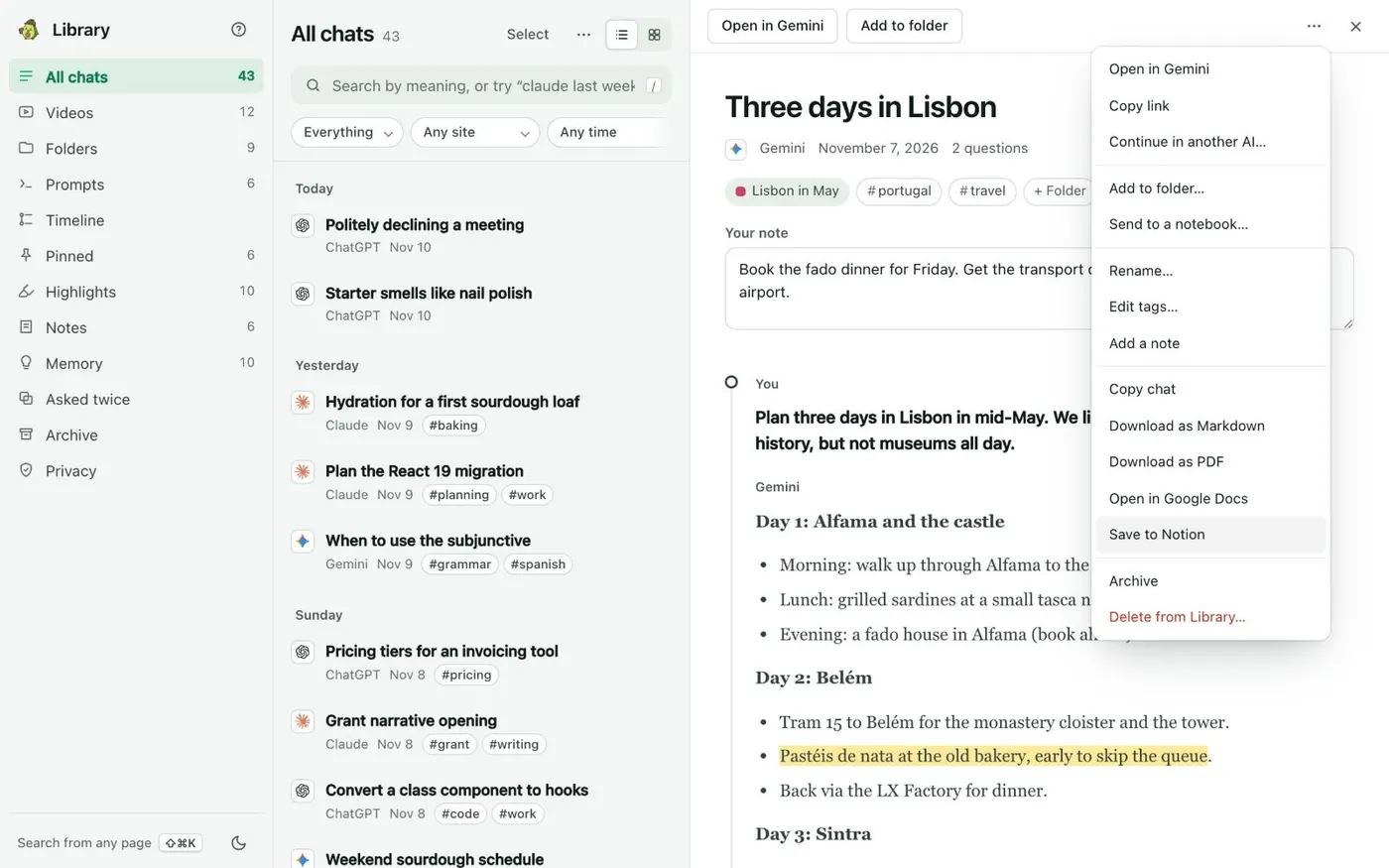
    If you use Kortex, a chat you delete on ChatGPT stays in your Kortex Library on your computer. To remove it there too, open ⋯ on the chat and choose Delete from Library…. Undo brings it back right after.

    A chat's menu open in the Kortex Library reader, listing Copy chat, Download as Markdown, Download as PDF, Open in Google Docs, Save to Notion, Archive and Delete from Library.
    Save to Notion sits in every chat’s menu.

If it doesn’t work

I do not see Delete all chats
Open Settings, then Data controls. The wording and the controls can vary by plan, workspace and device. If your account belongs to a work workspace, your organization may control retention.
I deleted a chat by mistake
ChatGPT cannot bring it back, and OpenAI Support cannot either. See how to recover deleted ChatGPT chats for what is still possible.
The chat is gone but ChatGPT still knows things from it
A saved memory is stored apart from the chat. Open Settings, then Personalization, then Memory, and delete the memory too. Deleting a chat alone does not necessarily delete it.

Questions people ask

Something we missed? Ask us.

Is deleting a ChatGPT chat permanent?

Yes. The chat leaves your account view right away. OpenAI schedules permanent removal within 30 days, with exceptions for security or legal needs. You cannot restore it.

What is the difference between deleting and archiving a chat?

Deleting is permanent. Archiving only hides the chat from your sidebar, and it stays saved in your account. See how to archive ChatGPT chats.

Does deleting my history delete my memories?

Not necessarily. Saved memories are stored separately from chats. Delete them from Settings, then Personalization, then Memory.

Can I delete chats on the phone app?

Yes. In the ChatGPT app, select the menu icon, find the conversation, press and hold its title, and select Delete.

Sources

Keep going

More tutorials

All tutorials

Do it on your own notebooks.

Install the Kortex extension and follow these steps on a notebook you already have.

100,000+ users, rated 4.5 on the Chrome Web Store.

Talk to the Kortex team

This opens a pre-filled email in Gmail. We usually reply within a day.