
Automate
Automation rules
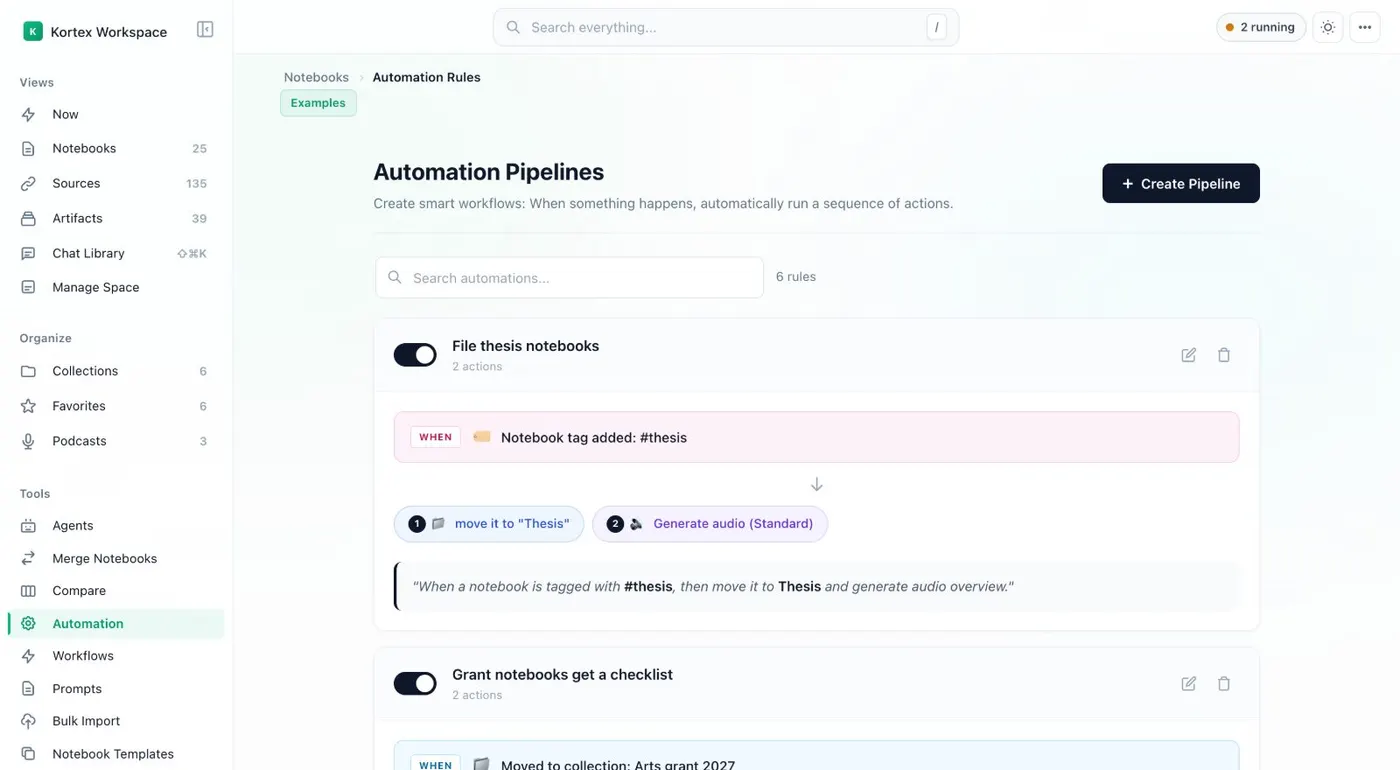
Kortex automation rules do work for your Gemini Notebook (formerly NotebookLM) notebooks. A rule is a trigger plus one or more actions. For example, when a notebook gets a tag, move it to a collection and generate an Audio Overview. Rules run in the background while Chrome is open.
What are Kortex automation rules?
Automation rules let Kortex act when something happens. A rule is a trigger plus one or more actions. For example, when a notebook gets a tag, move it to a collection and generate an Audio Overview. Rules run in the background while Chrome is open.
What you get
-
Tell it once
Name a rule, choose what starts it and what it should do. After that, tagging a notebook is enough.
-
Triggers that match how you work
A rule can start from a tag, a collection, a title, a new source from a page, a finished Audio Overview, or a schedule.
-
Real work as actions
A rule can move a notebook to a collection, add tags, generate audio or an artifact, add a note, send to a podcast, apply a template, or ask a question and save the answer.
-
Workflows from your AI assistant
Over Kortex MCP, an assistant can save a job as a workflow. The Workflows view can then run it on a schedule.
What is an automation rule?
A rule says: when this happens, do these things. You build it in the Kortex Workspace under Automation, with Create Pipeline. It asks for four things: Name, Trigger, Actions and Review. The Review step reads the rule back as a sentence, such as “When a notebook is tagged with #thesis, then move it to Thesis and generate audio overview.”
Triggers
- Notebook tag added or Source tag added
- Moved to collection
- Title contains text
- Domain Router, when a page’s address contains some text
- Audio is generated, and Episode Finishes
- On a schedule: Every hour, Every day or Every week, in your local time
A trigger can also require a Minimum Sources count.
Actions
A rule runs one or more of these, in order:
- Move to collection
- Add tag or Add source tag
- Generate audio, with a style and instructions
- Generate artifact (a briefing, study guide, flashcards, slide deck, infographic or quiz)
- Add note
- Send to podcast
- Apply source template
- Ask and save the answer
- Run a workflow
When do rules run?
Rules run in the background whenever Chrome is open. Schedules are checked every 15 minutes. Open Activity in the top bar to see what ran.
Workflows
A workflow is a set of steps your AI assistant did and saved by name, over Kortex MCP. The Workflows view lists them. You can schedule one, which makes a rule with a Run a workflow action. Only your assistant can make workflows.
Related: Templates, the podcast feed.
How it works
Want every step? Follow the tutorial.
-
Open Automation
In the Kortex Workspace sidebar, open Automation and click Create Pipeline.
-
Name it, then pick a trigger
The setup has four steps: Name, Trigger, Actions and Review. Choose what starts the rule.
-
Choose the actions
Add one or more actions. They run in order.
-
Review and switch it on
Read the rule's plain-English summary and save it. Leave Chrome open. Each rule has an on and off switch.
Questions people ask
Something we missed? Ask us.
Do rules run when Chrome is closed?
No. Pipelines run in the background only while Chrome is open. Schedules are checked every 15 minutes, so a scheduled rule needs Chrome running.
What can start a rule?
These can start a rule: a notebook or source tag added, a move to a collection, a title containing text, a page address matching the Domain Router, an Audio Overview being generated, an episode finishing, or a schedule (every hour, day or week). A trigger can also need a minimum number of sources.
Can I still do each step by hand?
Yes. Every action a rule runs is also a button in the Kortex Workspace. A rule does it for you when its trigger starts.
Where is a rule switched on or off?
On the rule's card in the Automation view. Kortex remembers whether a rule is on or off on the computer where you set it.
What happened to the older automation types?
Smart Sort, Escalator, Podcast Curator and the others were each moved into a pipeline once, named after the old type. Build new ones with Create Pipeline.
Can I automate NotebookLM with Kortex?
Yes. Kortex rules act on your Gemini Notebook (formerly NotebookLM) notebooks. A rule can move a notebook, add a tag, generate audio or an artifact, or send an episode to a podcast.
Try it on your own notebooks.
100,000+ people use the Kortex extension. Install it and try automation rules on a notebook you already have.
100,000+ users, rated 4.5 on the Chrome Web Store.