
Export
Export Studio notes and artifacts
Export Studio outputs is a Kortex button on a Gemini Notebook (formerly NotebookLM) notebook that opens Download Notes. Documents download as Markdown, text or PDF, slides as PDF, mind maps and infographics as PNG, and Audio Overviews and video as MP4. Quizzes and flashcards are not exported.
What does Export Studio outputs do?
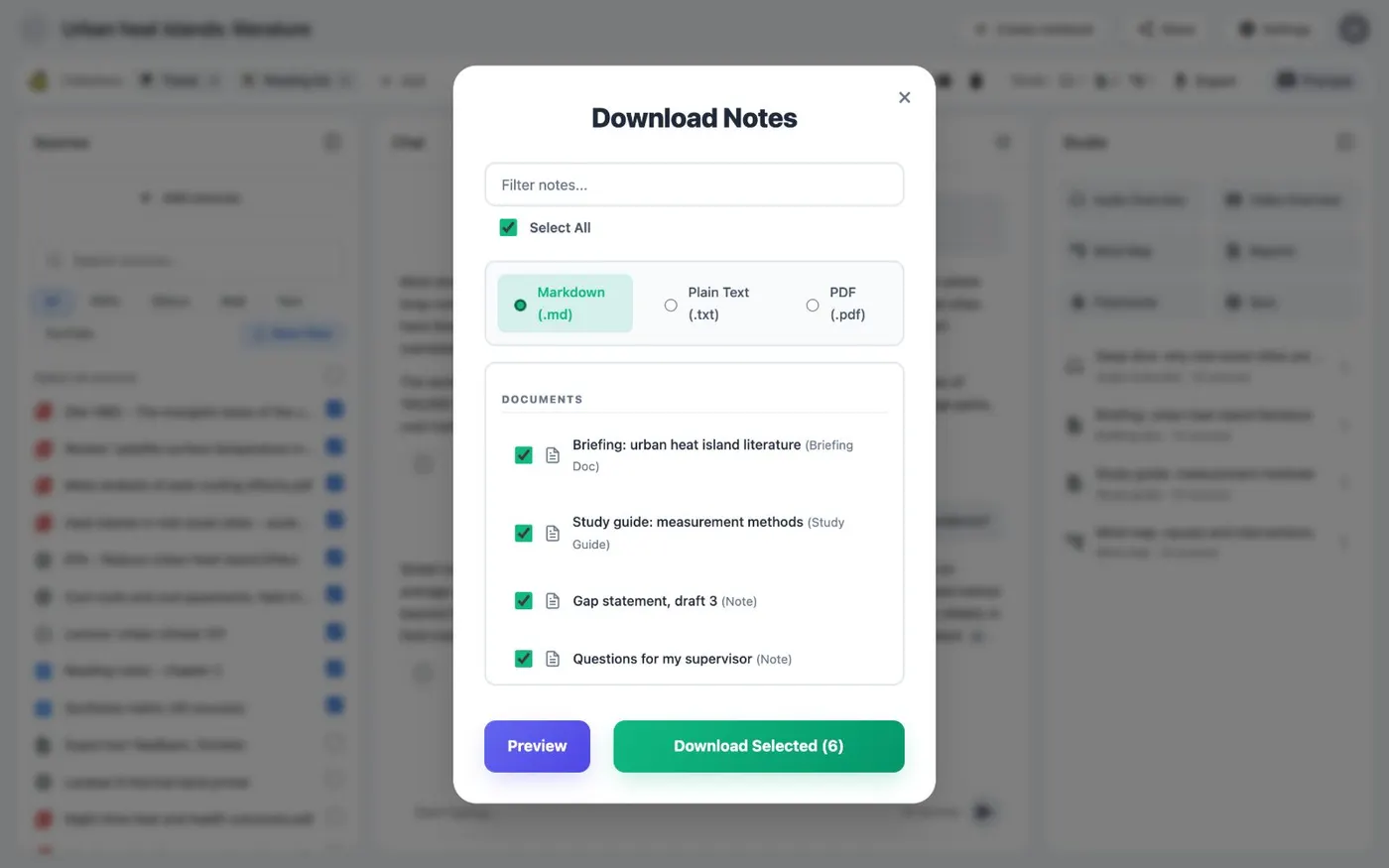
Export Studio outputs opens Download Notes on a notebook page. Documents such as briefings and study guides download as Markdown, text or PDF. Slides download as PDF. Infographics and mind maps download as PNG. Video and Audio Overviews download as MP4. Quizzes and flashcards are not exported.
What you get
-
Everything the Studio made, in one window
Notes, briefings, slides, mind maps and audio sit in one list with checkboxes. Tick what you want and download it all together.
-
A format that fits each kind
Documents come as Markdown, text or PDF. Slides come as PDF. Mind maps and infographics come as PNG images.
-
Audio and video as files
Audio Overviews and Video Overviews download as MP4. Keep them or play them anywhere.
-
From a notebook or across all of them
Use the Kortex bar on one notebook. Or use the Artifacts view in the Workspace to download Studio outputs from every notebook.
How do I export Studio outputs?
Open a notebook in Gemini Notebook. Kortex adds a bar under the title. Its Studio part shows how many outputs the notebook has, by type. Export Studio outputs opens the Download Notes window.
What leaves, and as what
The window has two groups.
- Documents. Briefings, study guides, FAQs and notes. Choose Markdown, text or PDF.
- Visual Assets. Slides download as PDF. Infographics and mind maps download as PNG images. Video Overviews and Audio Overviews download as MP4.
Quizzes and flashcards are not exported. A note you have open also has its own export button, with Markdown, HTML, text and PDF. Kortex has no PowerPoint, Word or Google Docs export.
One file or many
One file downloads as it is. Several files arrive as a ZIP. If you want the sources and chat too, see Export a notebook.
Across every notebook
The Artifacts view in the Kortex Workspace lists every Studio output across your notebooks. Filter by type or notebook, Preview before you download, then use Download on a selection or Download All. Move to Folder and New Folder file them.
What it is not
It does not make anything new. Kortex downloads what the Studio panel already has. Make the briefing, slides or Audio Overview in Gemini Notebook first. A notebook with an empty Studio has nothing to export.
How it works
Want every step? Follow the tutorial.
-
Open the notebook
Open a notebook in Gemini Notebook. The Kortex bar under the title shows how many Studio outputs there are of each type. It also has Export Studio outputs.
-
Click Export Studio outputs
The Download Notes window lists Documents and Visual Assets. Tick the items you want.
-
Choose a format for documents
Pick Markdown, text or PDF for documents. Slides, mind maps, infographics and video have one format each.
-
Download
Click Download Selected. One file downloads as it is. Several files arrive as a ZIP.
Questions people ask
Something we missed? Ask us.
Which Studio outputs can be exported?
Documents such as briefings, study guides and notes, slides, infographics, mind maps, video overviews and Audio Overviews. Quizzes and flashcards are not exported.
Are slides exported as PowerPoint?
No. Slides leave as a PDF. Kortex has no PowerPoint, Word or Google Docs export for Studio outputs.
Can I export one note on its own?
Yes. A note you have open has its own export button, with Markdown, HTML, text and PDF.
Can I download Studio outputs from all my notebooks at once?
Yes. The Artifacts view in the Kortex Workspace lists every Studio output across your notebooks. It has Download and Download All, and filters by type and notebook.
How do I download NotebookLM Studio notes?
Open a notebook in Gemini Notebook (formerly NotebookLM), then click Export Studio outputs in the Kortex bar. The Download Notes window lists the outputs. Pick the ones you want and a format.
Try it on your own notebooks.
100,000+ people use the Kortex extension. Install it and try export studio notes and artifacts on a notebook you already have.
100,000+ users, rated 4.5 on the Chrome Web Store.