Best MCP Servers for Research + Gemini Notebook (formerly NotebookLM)
The best MCP servers for research, by job: Consensus and PubMed find papers, scite checks them, and Kortex MCP lets Claude query your NotebookLM sources.
On this page
- What is an MCP server, and why use one for research?
- What are the best MCP servers for research?
- Which MCP servers find academic papers?
- Which MCP servers read full text?
- How do you verify citations with an MCP server?
- Where should your sources live so Claude can query them?
- What does a research MCP stack look like in practice?
- Are research MCP servers safe to use?
- How do you add research MCP servers to Claude or ChatGPT?
- Which MCP servers should you start with?
- Frequently asked questions
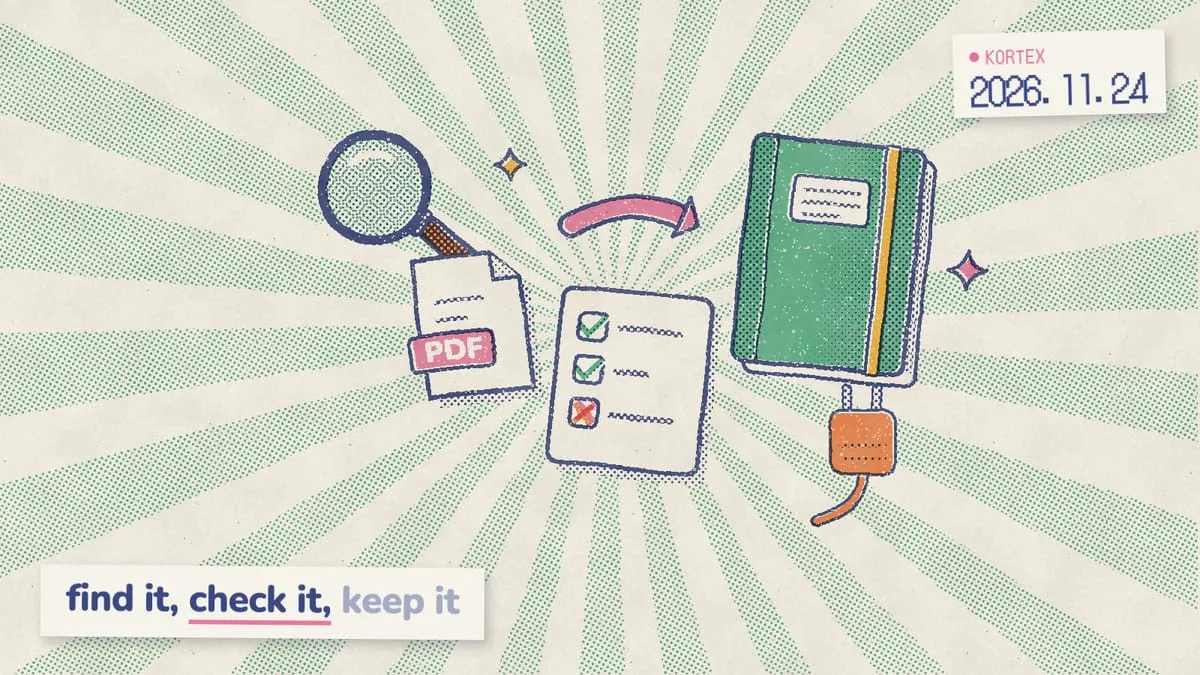
You have Claude or ChatGPT open, a question to answer, and a stack of papers you haven’t found yet. MCP servers are how your assistant reaches beyond what it remembers: they let it search PubMed, read an arXiv paper, check a DOI for a retraction, or ask your own notebooks. This guide ranks the best MCP servers for research by the job each one does, so you can connect three good ones instead of thirty random ones. The last job, keeping and querying your sources, is where Gemini Notebook (formerly NotebookLM) fits.
Researchers want this more than anyone. When we analyzed the 776 answers to the Kortex MCP waitlist survey (Sep 19 to Oct 1, 2026), 202 people (26%) described themselves as researchers, the largest profession in the survey (Kortex MCP waitlist survey, 2026). One of them asked to “find everything relevant to this scholarly problem across my NotebookLM estate.” Another wanted to keep “Zotero, local files for writing manuscripts and grants, and notebookLM” in sync. That’s not one server’s job. It’s a small stack.
What is an MCP server, and why use one for research?
MCP, the Model Context Protocol, is “an open-source standard for connecting AI applications to external systems” (Model Context Protocol docs, 2026). An MCP server is one connection: it gives Claude, ChatGPT or Cursor tools for a single service, such as PubMed or your Zotero library. The protocol’s docs compare MCP to “a USB-C port for AI applications.”
For research, that changes where answers come from. Without servers, your assistant answers from what it learned in training, and references recalled that way can be invented. A JMIR study found that 28.6% of the references GPT-4 produced for systematic reviews were hallucinated (Chelli et al., JMIR, via PubMed Central, 2024). With a search server connected, the assistant looks the paper up instead of recalling it. With a verification server, it can check the DOI before you do. If you’re new to the idea, our Gemini Notebook MCP server guide explains clients, servers and tools in more depth.
What are the best MCP servers for research?
The best MCP servers for research are Consensus and PubMed for finding papers and the arXiv MCP Server for preprints you want to read in full. Add scite to check citations before you use them, and Kortex MCP to ask your own Gemini Notebook sources. Zotero MCP covers your reference library. Each project’s own docs back the details below.
Here’s the shortlist, with who runs each server and what you need to connect it:
| Server | Job | Made by | How you connect | Account |
|---|---|---|---|---|
| Consensus | Find papers in every field | Consensus | Claude directory, ChatGPT Plugins, or https://mcp.consensus.app/mcp | Optional to try; sign in for more |
| PubMed | Find biomedical papers, read PMC full text | Anthropic | Claude directory | No sign-in |
| bioRxiv | Find bioRxiv and medRxiv preprints | Anthropic | Claude directory | No sign-in |
| Scholar Gateway | Search Wiley journals | Wiley | Claude directory | Sign-in required |
| arXiv MCP Server | Find, download and read arXiv papers | Open source (Apache 2.0) | Local install with uvx | None |
| Paper Search MCP | Search many open indexes at once | Open source (MIT) | Local install | None; some sources take free keys |
| Fetch | Read any public web page | MCP steering group (reference server) | Local install | None |
| scite | Verify claims and citations | scite (Research Solutions) | Claude directory or ChatGPT plugin | scite premium subscription |
| Zotero MCP | Search and read your Zotero library | Open source (MIT) | Local install | Zotero |
| Kortex MCP | Store and query sources in Gemini Notebook | Kortex (that’s us) | One URL, OAuth sign-in | Kortex Pro or Lifetime |
Most of the ranking lists we read for this guide stop at search. The bigger gaps are verification and the last row: somewhere to keep the papers so the next question starts from them.
Which MCP servers find academic papers?
Consensus is the broadest academic search server, and the PubMed connector is the default for biomedicine. For computer science, physics and maths preprints, add the arXiv MCP Server. Paper Search MCP covers many open indexes in one call. Pick one or two for your field, not all of them.
Consensus: one index for every field
The official Consensus MCP server offers semantic search over “400M+ scholarly articles, including 350M peer-reviewed papers and all of PubMed.” It returns ranked papers with DOIs, citation counts, study type and sample size. Its filters are the reason researchers like it: you can limit results to randomized controlled trials, meta-analyses or systematic reviews (19 study types), a minimum sample size, or top-quartile journals. It’s a hosted server, so nothing to install, and its README says no account is needed to try it; signing in gets more papers per search. In Claude, find it in the Connectors Directory. In Claude Code, it’s one command: claude mcp add --transport http consensus https://mcp.consensus.app/mcp.
PubMed and bioRxiv: Anthropic’s biomedical connectors
The PubMed connector is made by Anthropic and “provides access to PubMed’s biomedical citations and PubMed Central’s full-text archive.” No sign-in is required. Its seven tools include search_articles, find_related_articles, get_full_text_article (when the paper is in PMC) and lookup_article_by_citation, which comes back in the verification section. Its sibling, the bioRxiv connector, searches bioRxiv and medRxiv preprints, papers “posted before peer review,” so label them that way in anything you write.
arXiv MCP Server: preprints you can read in full
The community arXiv MCP Server (Apache 2.0) has 19 tools. Beyond search_papers, it can download_paper to local Markdown, read_paper in chunks, pull the author’s LaTeX, map a citation_graph, and watch_topic for new papers. Papers land in ~/.arxiv-mcp-server/papers. Install it with uvx arxiv-mcp-server; the README warns that an unrelated npm package uses the same name, so don’t install it with npm or npx.
Paper Search MCP and Scholar Gateway
Paper Search MCP (MIT) searches many open sources at once and removes duplicates, from arXiv and Semantic Scholar to Crossref, OpenAlex and Europe PMC. Its README is honest about weak spots: Google Scholar searches can fail on bot detection, and Sci-Hub is an optional source marked “user responsibility.” Leave that one off.
Scholar Gateway, from John Wiley & Sons, “searches current literature from Wiley journals” and needs a sign-in. For the open web, Brave and Exa both run official search servers.
Which MCP servers read full text?
Search gives you abstracts; reading needs full text. The arXiv MCP Server, the PubMed connector (for PMC papers) and scite’s read_fulltext read papers directly. Fetch reads any public web page. Zotero MCP reads the PDFs already in your library.
- Fetch is one of the reference servers kept by the MCP steering group. It “fetches a URL from the internet and extracts its contents as markdown” and reads long pages in chunks (Fetch README, 2026). For example, use it for a lab page, a dataset README or a policy document.
- scite has
read_fulltextandget_pdf_link. Quoted text comes back “only for openly licensed papers and papers your organization is licensed for” (scite docs, 2026). - Zotero MCP (MIT) lets your assistant “search, read, cite and annotate” the papers already in your Zotero library. Our Zotero and Gemini Notebook guide walks through setup and a two-server recipe.
One caution on Fetch. Its README warns that it “can access local/internal IP addresses and may represent a security risk,” although by default it refuses private addresses. The MCP servers repository also calls its servers “educational examples,” not “production-ready solutions” (MCP servers repository, 2026). Fine for personal research; check before using one at work.
How do you verify citations with an MCP server?
Run every reference through a checker before it goes into your draft. scite’s MCP server flags retractions, corrections, expressions of concern and errata, and its check_claim tool finds sentences in the literature that support or dispute a claim. The PubMed connector’s lookup_article_by_citation confirms that a biomedical citation points at a real paper.
scite’s docs are blunt about the rule: “Check editorialNotices on every paper before citing it, even when you haven’t filtered on these. A paper can be accurate and still be withdrawn” (scite docs, 2026). Each search result also carries scite’s Smart Citation tally: how many citing statements support it, contrast it or merely mention it. The verification tools go further. check_claim takes up to 20 claims and returns “the sentences in the literature closest to it,” with each paper’s retraction and dispute status, and verify_papers checks every DOI you’re about to cite (scite verification docs, 2026). These tools need a scite premium subscription.
Verification also covers your own reading. A search server answers “what exists.” A checker answers “should I trust it.” Neither one remembers, three weeks later, which 14 papers you decided to keep. That job needs a place for your sources, and our sibling post on why ChatGPT gives fake citations shows what goes wrong when answers come from memory instead.
Keep the papers you verified, and ask them later
Kortex MCP lets Claude or ChatGPT add the papers you kept to a Gemini notebook, then ask it for answers with citations. Kortex MCP is included with Kortex Pro and Lifetime.
Where should your sources live so Claude can query them?
Keep them somewhere you can question the selected sources and check the cited passages. Gemini Notebook supports that workflow (Gemini Notebook Help, 2026). Its chat also has experimental web and code actions, so request source-based answers explicitly. Kortex MCP connects your assistant to the notebook.
Gemini Notebook has no public consumer API, so Claude can’t reach it on its own. Kortex MCP is the bridge. Your assistant calls one address, and each call runs through the Kortex extension in your own Chrome, which uses the Google session you’re already signed into (Kortex MCP docs, 2026). We built it, so weigh this section accordingly. For research, these tools do the work:
| Tool | What it does for research |
|---|---|
add_url_source | Adds a web page or YouTube link to a notebook as a source |
start_file_upload | Uploads a local PDF, DOCX or TXT, up to 50 MiB, in chunks |
research_sources | Runs Gemini Notebook’s own Fast or Deep Research to find sources |
ask_question | Asks one notebook; returns the answer, its citations and a session for follow-ups |
ask_library | Asks the same question across up to three notebooks, each answer kept separate |
batch_to_vault | Runs a long list of questions against a notebook and keeps every cited answer |
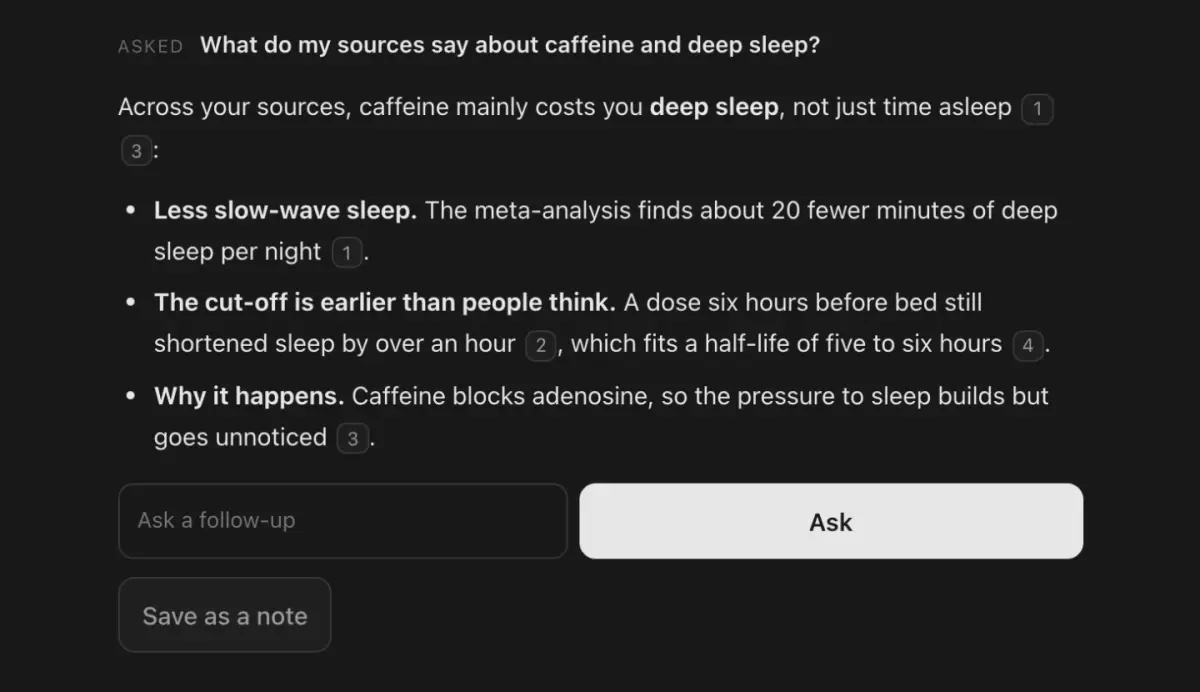
In clients that show interactive panels, ask_question opens one like this: the answer, numbered citations, a follow-up box and a button to save the answer as a note.
Kortex never reads Consensus, PubMed or Zotero. Your assistant reads them with their own servers, and Kortex MCP carries the papers into a notebook and the cited answers back out. Our guide to connecting Gemini Notebook to Claude and ChatGPT covers setup step by step, and if you’re weighing Kortex against an open-source option, see Kortex MCP vs notebooklm-mcp-cli.
The same survey shows what researchers want from that store. In all, 110 of the 776 respondents asked to query their notebooks for cited answers from their assistant, and 20 asked for help with literature reviews specifically (Kortex MCP waitlist survey, 2026). One wrote that they want the assistant “to distinguish information contained in authoritative project sources from assumptions or general AI knowledge and return citations.” A grounded notebook draws exactly that line.
What does a research MCP stack look like in practice?
Three servers cover most of it: Consensus to find, scite to check, Kortex MCP to store and ask, chained in one chat. Here’s a recipe for Claude with all three connected; swap Consensus for PubMed or arXiv if that’s your field.
Step one finds and checks:
Use Consensus to find randomized controlled trials and meta-analyses on whether
retrieval practice improves long-term retention in university students. Give me
the 12 strongest, with DOIs. Then check each DOI with scite and drop any paper
with a retraction, correction or expression of concern. Tell me what you dropped.
Step two stores what survived:
With Kortex, create a Gemini notebook called "Retrieval practice review" and add
each remaining paper as a source from its open-access link. List the papers with
no open-access version so I can upload the PDFs I have access to.
Gemini Notebook can only read what a link shows it, so a paywalled publisher page won’t give it the paper. Uploading your own PDFs through start_file_upload fills those gaps. Step three asks the notebook, not the model’s memory:
Ask the "Retrieval practice review" notebook where the studies agree on the size
of the effect and where they disagree. Quote the passages behind each point, and
label anything that isn't from the notebook as "my note".
The answer now comes from checked papers, passages attached, and the notebook is still there next week. For the wider method, see how to use Gemini Notebook for research, and our sibling post on AI for systematic reviews goes stage by stage when the review has to be formal.
Find, check, then ask your own papers from Claude
Add Kortex MCP next to Consensus or PubMed, and Claude can file the papers you kept into a Gemini notebook and answer from them with citations. Kortex MCP is included with Kortex Pro and Lifetime.
Are research MCP servers safe to use?
Mostly, if you treat each server as a third party that sees your queries. Anthropic’s own guidance says verification “isn’t a security audit,” that it “doesn’t control how” a third-party connector “handles your data,” and that you should “stay aware of prompt injection risks” (Claude connector verification, 2026).
Claude’s Connectors Directory labels each listing. Verified means Anthropic tested the connector’s tools; Community means it was screened but not reviewed in depth; Custom means you added it by URL and nobody at Anthropic looked at it. The labels describe review, not power: “Once connected, a Community connector’s tools have the same capabilities and access as any connector you grant” (Claude connector verification, 2026).
Three habits keep research data safe:
- Keep unpublished work out of hosted search servers. Your query goes to the server’s operator. Search for published literature; keep embargoed results and participant data out of prompts.
- Watch for prompt injection. Prompt injection is text in a web page or document that tries to give your assistant instructions. Claude Code’s docs warn that “servers that fetch external content can expose you to prompt injection risk” (Claude Code MCP docs, 2026).
- Use read-only access where you can. A new Kortex API key starts on the Read-only profile, so the assistant can ask notebooks but can’t change or delete anything (Kortex MCP docs, 2026).
How do you add research MCP servers to Claude or ChatGPT?
Directory connectors take one click; anything else is a custom connector added by URL. In Claude, open Customize > Connectors and select the plus button. Free Claude users are limited to one custom connector (Claude Help Center, 2026).
- Claude and Claude Desktop: browse the directory for PubMed, bioRxiv, Consensus, scite or Scholar Gateway. For a server that isn’t listed, choose Add custom connector and paste its URL.
- Claude Code:
claude mcp add --transport http <name> <url>adds a remote server. Local servers like the arXiv MCP Server run on your machine throughuvx. - ChatGPT: Consensus and scite are in Plugins. Custom MCP servers depend on your plan: OpenAI lists full MCP support for Business, Enterprise and Edu, and read and fetch permissions for ChatGPT Pro (OpenAI Help Center, 2026).
How many MCP servers should you connect?
Start with three, one per job you actually do. In Claude Code, tool search keeps the cost down: “Only tool names and server instructions load at session start, so adding more MCP servers has minimal impact on your context window” (Claude Code MCP docs, 2026). The bigger cost is choice: with five search servers connected, your assistant has to guess which index you meant, so name the server in the prompt (“use PubMed”) when it matters.
Which MCP servers should you start with?
In short: one server to find papers in your field, one to check them, and one place to keep the ones you trust. For most researchers that’s Consensus or PubMed, scite, and Kortex MCP with Gemini Notebook, plus Zotero MCP if your library lives there. Kortex needs Chrome open with the extension signed in, and the first call after Chrome sits idle can take up to 30 seconds.
Give your research stack a memory with citations
Search servers find papers. Kortex MCP lets Claude and ChatGPT keep the ones you chose in Gemini Notebook and ask them for cited answers. Kortex MCP is included with Kortex Pro and Lifetime, and Kortex itself is free on Chrome.
Frequently asked questions
What is the best MCP server for academic research?
There isn’t one best server, because research has four jobs. For finding papers, Consensus covers 400M+ scholarly works across every field, and the PubMed connector covers biomedicine. For checking citations, scite flags retractions and corrections. For keeping and querying your own sources, Kortex MCP connects Gemini Notebook. Start with one finder and one checker.
Are there free MCP servers for research?
Yes. Claude’s PubMed and bioRxiv connectors need no sign-in, Consensus can be tried without an account, and the arXiv MCP Server and Paper Search MCP are open source. scite’s tools need a scite premium subscription. Kortex MCP is included with Kortex Pro and Lifetime.
Which Claude connectors are best for research?
In Claude’s Connectors Directory, look at PubMed and bioRxiv (both made by Anthropic), Consensus, scite and Wiley’s Scholar Gateway. Any other remote server can be added as a custom connector by URL under Customize > Connectors. Free Claude users can add one custom connector.
Can an MCP server do a literature review for me?
No single server does the review. MCP servers do the steps: search indexes, read full text, check references and store the papers you keep. The judgment calls stay with you: the question, which studies to include, and what the evidence means.
Can Claude search my NotebookLM notebooks through MCP?
Yes, with Kortex MCP. The Kortex ask_question tool asks one Gemini Notebook (formerly NotebookLM) and returns the answer with its citations, and ask_library asks up to three notebooks at once. Chrome has to be open with the Kortex extension signed in. Kortex MCP is included with Kortex Pro and Lifetime.
Are research MCP servers safe to use?
Treat each one as a third party that sees your queries. Anthropic says verification isn’t a security audit and that it doesn’t control how a third-party connector handles your data. Connect only developers you trust, keep unpublished data out of hosted search servers, and use read-only access where a server offers it.
Editorial note: fact-checked against the official help pages and docs linked above on November 25, 2026. Spotted something out of date? Contact us and we will fix it, or read more about Kortex.