AI for Systematic Reviews and Gemini Notebook (formerly NotebookLM)
AI for systematic reviews, stage by stage: which AI tools help with screening and data extraction, what stays human, and where NotebookLM fits your papers.
On this page
- Can AI do a systematic review on its own?
- Where does AI help at each stage of a systematic review?
- Which AI tools are built for systematic reviews?
- How do you use Gemini Notebook (formerly NotebookLM) for a systematic review?
- How do you keep AI-assisted extraction auditable?
- What should you report about AI use in a systematic review?
- What should you set up first?
- Frequently asked questions
AI for systematic reviews works best as a second pair of hands, not as the reviewer. Tools built for the job can rank thousands of records for screening, suggest data with the quote behind it, and flag likely trials. But studies show chatbots miss most relevant papers when asked to search. So the search, every final include or exclude, and every extracted number stay with people. This guide goes stage by stage, from protocol to PRISMA reporting. It names the tools built for each job and shows where Gemini Notebook (formerly NotebookLM) fits: extraction and synthesis over the fixed set of papers you’ve already included.
Researchers are the largest group on our own waitlist, too. When we analyzed the 776 answers to the Kortex MCP waitlist survey (Sep 19 to Oct 1, 2026), 202 people (26%) named researcher as a profession, and 20 asked specifically for help with literature reviews. Every number below links to the original paper or help page it comes from.
Can AI do a systematic review on its own?
No, and the evidence is clear about why. A systematic review is a study of studies. It answers one question by finding all the research that meets rules set in advance, checking each study, then pooling what they say. A 2025 systematic review in Research Synthesis Methods pooled 19 studies that compared generative AI with expert reviewers. Used for searching, AI missed 68% to 96% of relevant studies (median 91%). In screening, it made wrong exclusions at a median of 28%. Data extraction errors had a median of 14%, and risk-of-bias errors a median of 27% (Clark et al., Research Synthesis Methods, 2025).
The authors’ conclusion is worth quoting: “the current evidence does not support GenAI use in evidence synthesis without human involvement or oversight.” Still, for most tasks other than searching, they say AI “may have a role in assisting humans.” That’s the honest frame for everything below: AI drafts, people decide.
Look closely at the two screening bars. A wrong inclusion costs you a few minutes, because the paper gets a full-text read and drops out. A wrong exclusion costs you a study, because nobody looks at it again. So when an AI screens, its “exclude” pile deserves more suspicion than its “include” pile.
General chatbots also invent papers. When researchers asked chatbots to find the studies behind 11 published systematic reviews, 28.6% of GPT-4’s 119 references were hallucinated, and 91.4% of Bard’s (JMIR, 2024). Our guide to ChatGPT fake citations shows how to check a reference before you trust it.
Where does AI help at each stage of a systematic review?
AI helps most where a task is repetitive and easy to check, and least where it needs judgment you’ll sign. The table maps each stage to what AI can do, what stays human, and the tools built for it. The rules come from the Cochrane Handbook and the 2025 joint position statement, cited below.
| Stage | Where AI helps | What stays human | Built for it |
|---|---|---|---|
| Protocol | Brainstorm synonyms and PICO terms, test if the question is answerable | The question, eligibility criteria, registration | Any chatbot |
| Search | Preliminary scoping searches, draft terms for a librarian to test | The full, reproducible database search | Elicit (as an adjunct) |
| Title and abstract screening | Rank records by likely relevance, tag likely trials | Every include and exclude, and when to stop | ASReview, Covidence, Rayyan, Elicit |
| Full-text screening | Show the passage behind a suggested decision | The final call, by two people independently | Elicit |
| Data extraction | Draft values with the supporting quote | Checking every value; outcome data by two people | Covidence, Elicit, Gemini Notebook |
| Risk of bias | Point to the passages a domain depends on | The judgment itself | No tool you should trust alone |
| Synthesis | Group findings by theme, draft comparison tables | Statistics, certainty of evidence, conclusions | Gemini Notebook |
| Reporting | Check the draft against the PRISMA checklist | Disclosing AI use, the claims you sign | Any chatbot |
Protocol and search
Keep AI out of the search that your review depends on. In an evaluation against four published evidence syntheses, Elicit found an average of 39.5% of the included studies, against 94.5% for the original searches. Its precision was higher, though: 41.8% against 7.55%, and it surfaced some studies the original searches missed (Lau and Golder, Cochrane Evidence Synthesis and Methods, 2025). The authors call it “a useful adjunct”. In practice, that makes it good for a scoping look before the protocol and a poor substitute for the database search itself.
AI for systematic review screening
Screening is where AI has the longest track record. The Cochrane Handbook says automation can “reduce the need for manual screening by at least 30% and possibly more than 90%”. The price is up to a 5% reduction in sensitivity (Cochrane Handbook, chapter 4). Most tools do this with active learning. Active learning is a method where the model re-ranks the remaining records after each of your decisions, so likely includes rise to the top.
Ranking is not deciding, however. Cochrane’s standard is to use “(at least) two people working independently” to decide eligibility. One person may do the first title and abstract pass, but two people must make the final determination. The Handbook also says automatically eliminating records “has not been recommended for use in Cochrane reviews at the time of writing in mid-2023”.
AI for systematic review data extraction
Extraction is the most promising stage for large language models, and the one that most needs checking. In a proof-of-concept study, Claude 2 extracted 160 data elements from 10 open-access trials with 96.3% accuracy, making 6 errors, most of them missed items (Gartlehner et al., Research Synthesis Methods, 2024). That was a small convenience sample, though. Across studies, the median error rate was 14% (Clark et al., 2025).
The Cochrane Handbook’s data chapter is blunt: “we cannot recommend a specific tool for automating data extraction for routine systematic review production”. It also makes extraction of outcome data by “(at least) two people working independently” mandatory (Cochrane Handbook, chapter 5). So treat the AI as a fast first extractor whose every cell gets verified.
Risk of bias and synthesis
Risk of bias is a judgment, and AI got a median 27% of those wrong (Clark et al., 2025). Let it find the passages on how groups were assigned or blinded, then decide yourself. For synthesis, AI is good at grouping findings by theme and putting papers side by side. Effect sizes, pooled stats and how sure you can be belong in your stats software and with your team.
Which AI tools are built for systematic reviews?
Four tools show up in university library guides, and each one describes its AI differently. Here’s what their own pages say. Prices and plans change, so check each site.
- ASReview is an open-source screening tool that learns from your decisions as you go. It calls itself “fully open-source” and promises “full control over your data and decisions” (ASReview).
- Covidence covers the whole workflow. Its Relevance Sorting uses “an active learning model that predicts the likelihood of the inclusion of the remaining references” (Covidence). It also has the Cochrane RCT Classifier and removes duplicates automatically. For extraction, “suggestions point you to the supporting text in the source” (Covidence).
- Rayyan is a collaborative screening tool, “free forever for basic use”, and sells its ResearchPilot AI search, screening and extraction to institutions (Rayyan).
- Elicit runs a guided workflow from search through screening and extraction to a report. Every screening decision “shows the quote from the paper behind it”, and every extraction cell links to supporting quotes. Dual review is on Enterprise plans only (Elicit Help Center).
Notice what they share. The good ones show you the evidence behind each suggestion and leave the decision with you. Apply the same test to any AI tool before it touches your review.
How do you use Gemini Notebook (formerly NotebookLM) for a systematic review?
Use it after screening, on the papers you’ve included. Gemini Notebook lets you select the sources used for questions and provides citations to their passages (Gemini Notebook Help, 2026). Google also documents web research and experimental chat actions. For this review workflow, keep extraction tied to the included papers; search and eligibility decisions still need your protocol and human review. Check every extracted value against the full text.
Build one notebook per review
Add only the included full texts, one source per study, and name each source “First author Year” so citations read cleanly. Free accounts get 50 sources per notebook, Plus 100 and Pro 300 (Gemini Notebook Help, 2026). Each source can hold up to 500,000 words or 200 MB (Gemini Notebook Help, 2026). Before you upload, check your library’s licence terms. Some university guides, such as King’s College London’s, warn that uploading copyrighted full texts to AI tools is generally not allowed. If your papers live in Zotero, our Zotero to Gemini Notebook guide covers moving a collection across.
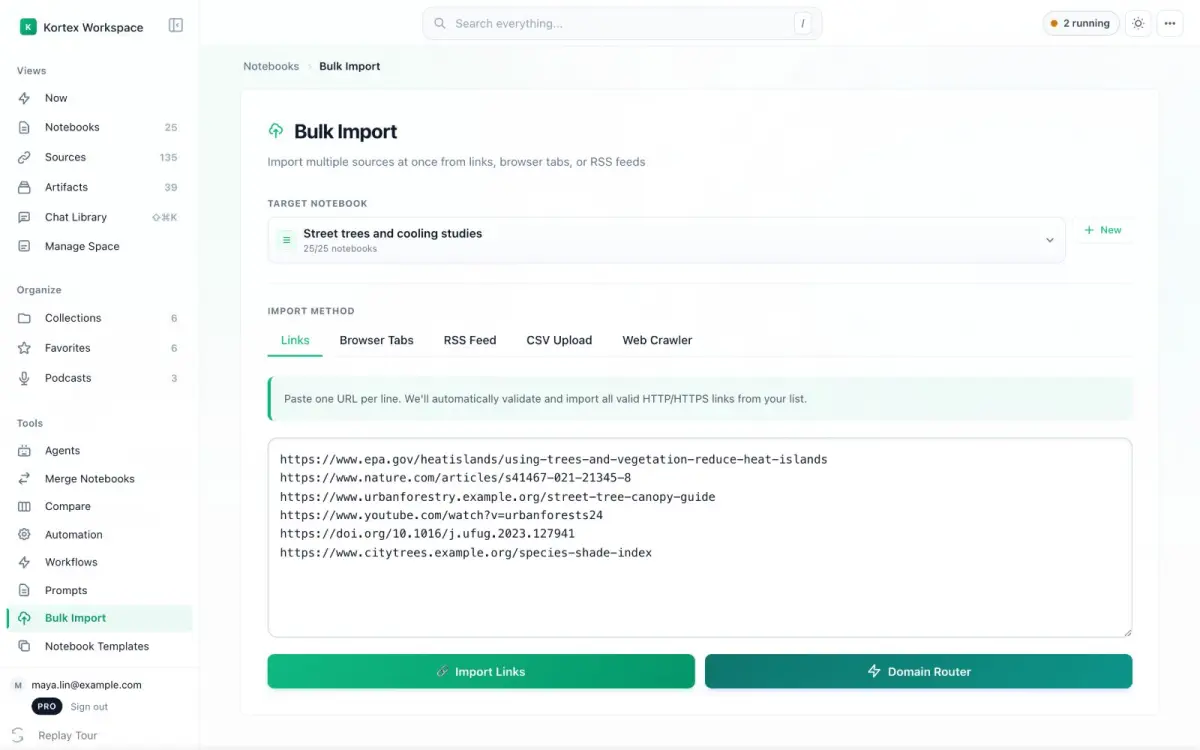
Adding 30 papers one at a time is the slow part. Kortex’s Bulk Import takes a list of links, one per line, and adds every page to one target notebook.
Draft the extraction table with a Data Table
In the Studio panel, choose Data Table, select the pencil icon and describe the rows and columns. Then use Export to Sheets, which puts the table on the first tab of a new Google Sheet and “any citations” on the second (Gemini Notebook Help, 2026). That second tab is your audit trail. Paste a prompt like this:
One row per included study. Columns: Study (first author, year) | Design | Country and setting | Participants (n and key characteristics) | Intervention | Comparator | Outcomes measured | Follow-up | Main result for [primary outcome], with numbers exactly as reported | Funding source.
If a study does not report an item, write "Not reported". Do not calculate, convert or infer any value.
Pilot it before you trust it. Run the table on two or three papers you’ve already extracted by hand and compare cell by cell. The position statement asks authors to report how a tool was “validated (and piloted, if applicable)” for their specific review. Then two reviewers check every cell against its cited passage, and disagreements go through the process your protocol set out. For a ready-made version, see the literature matrix Data Table prompt.
Synthesize by theme, with citations
Once extraction is checked, use chat to compare studies by theme: where they agree, where they conflict and why. The literature review prompt asks for themes, conflicts and gaps, and tells the model to write “Not covered in the sources” rather than fill a gap. Select a subset of sources to ask about one outcome at a time, since Google lets you choose which sources the model uses. For reading each paper closely first, see how to read research papers with AI.
Set up a review notebook in minutes, not an afternoon
Kortex's Bulk Import adds a whole list of links to one notebook at once, and collections keep each review in its own folder. Then download the sources and the chat as Markdown or PDF for your records. Free on Chrome.
How do you keep AI-assisted extraction auditable?
Keep three things for every AI-assisted step: the prompt, the raw output and the record of your check. The position statement asks authors, “wherever possible and practical”, to make inputs such as prompt development, outputs, datasets and code publicly available. A notebook makes the first two easy if you save them as you go.
- The prompt. Save it once and reuse the exact wording for every batch and every update. Kortex’s Prompts Library stores prompts with folders and fill-in blanks.
- The raw output. Export the Data Table to Sheets before anyone edits it. Kortex can also download the notebook chat as Markdown, PDF or JSON, with switches to include your questions and sources.
- The check. Mark each source as you verify it. In the Kortex Workspace, each source can carry one of eight highlight colors and a Markdown note, so “green = second reviewer done” works as a status column.
For updates, keep each review in its own Kortex collection, with a folder per update.
What should you report about AI use in a systematic review?
Report any AI that made or suggested a judgment. Cochrane, the Campbell Collaboration, JBI and the Collaboration for Environmental Evidence set this out in a joint 2025 position statement. It builds on RAISE. RAISE (Responsible use of AI in evidence SynthEsis) is a set of recommendations for using AI responsibly at every stage of evidence synthesis. The statement says AI “should be used with human oversight”. It adds that “any use of AI or automation that makes or suggests judgments should be fully and transparently reported” (JBI Evidence Synthesis, via PMC, 2025). Judgments include eligibility, risk of bias, data extraction, synthesis and plain language summaries. Spelling and grammar help generally doesn’t need listing, though journals vary.
The statement lists what to report:
- The name, version and dates of each AI tool you used.
- Its purpose, and which stages of the review it affected.
- Your justification, including evaluations of the tool and how you validated and piloted it.
PRISMA 2020 is the standard reporting guideline for systematic reviews: a 27-item checklist plus flow diagrams. It already has a slot for this. Item 8 (selection process) and item 9 (data collection process) both ask for “details of automation tools used in the process” (PRISMA 2020, BMJ, 2021). Here’s a template for a Methods sentence. Fill the brackets with your own facts:
“[Tool, version] generated draft extraction values for all [n] included studies on [dates], using the prompt in Supplementary File [x]. Two reviewers independently verified every value against the cited passage.”
What should you set up first?
In short: let AI rank, draft and point; let people search, decide and sign. Start small:
- Pick a screening tool built for the job, and keep two independent reviewers for final decisions.
- After screening, put the included full texts in one notebook and pilot a Data Table on papers you’ve already extracted.
- Save the prompt, export the raw output, and record every check.
- Draft your AI disclosure as you go, not the night before submission.
For the wider research workflow, see how to use Gemini Notebook for research, and for the failure modes to watch, does Gemini Notebook hallucinate?
Keep every review's papers, prompts and outputs in one place
Kortex adds folders, bulk import, saved prompts and export to Gemini Notebook, so your extraction notebook stays organized and every output has a copy you can archive. Free on Chrome.
Frequently asked questions
Can AI do a systematic review?
Not on its own. A 2025 systematic review of 19 studies found generative AI missed a median 91% of relevant studies when used to search and got a median 14% of data extractions wrong. AI can rank records, suggest extraction values and draft tables, but people make the final decisions.
What is the best AI tool for systematic reviews?
It depends on the stage. ASReview, Covidence, Rayyan and Elicit are built for screening, and Covidence and Elicit also suggest extraction values with the supporting text. Gemini Notebook fits later, for extraction tables and synthesis over the papers you have already included.
Is there a free AI tool for systematic reviews?
Yes. ASReview is fully open source and does AI-assisted screening. Rayyan has a free plan for basic use, and its ResearchPilot AI features are sold to institutions. Gemini Notebook’s free plan holds 50 sources per notebook, so it fits a review with up to 50 included studies.
Can I use NotebookLM for a systematic review?
Yes, for part of it. Gemini Notebook (formerly NotebookLM) can’t run a reproducible database search or screen thousands of records. It works after screening: add the included full texts, build a Data Table for extraction, export it to Sheets with its citations, and have reviewers check every cell.
Can ChatGPT screen studies for a systematic review?
It can suggest decisions, but it shouldn’t make them. Across the studies in a 2025 systematic review, generative AI made wrong exclusion decisions at a median rate of 28%. Cochrane’s standard is at least two people working independently to make the final eligibility decision.
Do you have to disclose AI use in a systematic review?
Yes, whenever it makes or suggests judgments, such as eligibility, extraction, risk of bias or synthesis. The 2025 position statement from Cochrane, Campbell, JBI and CEE asks for the tool name, version and dates, what it was used for, and why it was justified.
Editorial note: fact-checked against the official help pages and docs linked above on November 25, 2026. Spotted something out of date? Contact us and we will fix it, or read more about Kortex.