 ## What is Gemini Notebook missing?
Gemini Notebook is missing the tools that act on your research: bulk export, a prompt library, tags and automation. That said, the core is strong. [Gemini Notebook](https://notebook.google.com) answers from the files, links and videos you add, with citations back to each passage, and its traffic grew more than 200% in October 2024 to 31.5 million visits ([Similarweb](https://www.similarweb.com/blog/insights/ai-news/chatgpt-notebooklm/), 2024). Grounding helps; nevertheless, it isn't perfect. A 2026 study notes that grounding a model in retrieved text "reduces unsupported statements but does not eliminate them" ([Mulakkayala et al., arXiv](https://arxiv.org/abs/2608.29307), 2026), so it's still worth clicking the citations. It was called NotebookLM until Google [renamed it in July 2026](/blog/notebooklm-renamed-gemini-notebook). However, the gap shows up the moment you need to act on that research. Imagine you've spent two hours on a literature review: 20 papers, a briefing doc and a chat that surfaced the key contradictions. Now, for example, you want to share the brief, paste quotes into your paper or archive the session. In plain Gemini Notebook, consequently, most of that is copy and paste.
Here's what's missing, specifically:
- **No bulk export.** Notes go to Google Docs one at a time, and no button exports a notebook's sources or chats.
- **No prompt library.** You retype the same research questions every session.
- **Thin organization.** Native Collections started rolling out in July 2026 and work like playlists ([Android Authority](https://www.androidauthority.com/gemini-notebook-collections-feature-3689444/), 2026), but there are still no tags or nested folders.
- **No automation.** Every step is manual, every time.
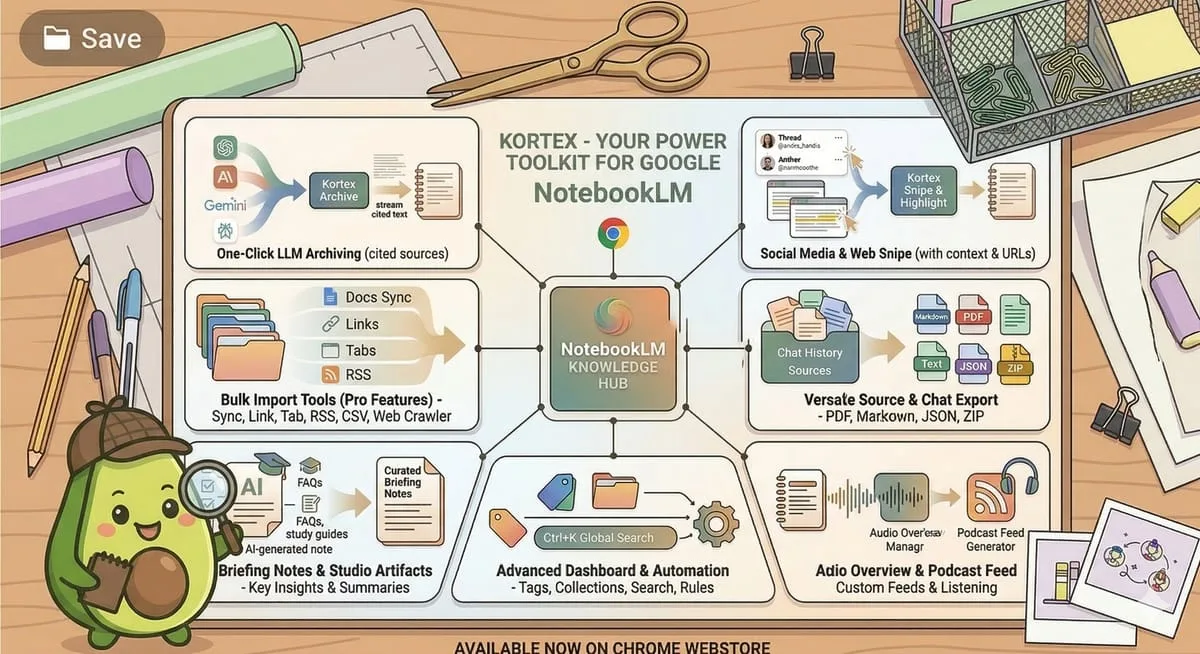
Google built Gemini Notebook as a research assistant, not a file manager. Kortex, in contrast, fills the gaps outside that scope without changing how Gemini Notebook works. For a head-to-head view, the [Kortex vs Gemini Notebook comparison](/blog/kortex-vs-notebooklm) lists the exact feature gaps.
## What is Gemini Notebook missing?
Gemini Notebook is missing the tools that act on your research: bulk export, a prompt library, tags and automation. That said, the core is strong. [Gemini Notebook](https://notebook.google.com) answers from the files, links and videos you add, with citations back to each passage, and its traffic grew more than 200% in October 2024 to 31.5 million visits ([Similarweb](https://www.similarweb.com/blog/insights/ai-news/chatgpt-notebooklm/), 2024). Grounding helps; nevertheless, it isn't perfect. A 2026 study notes that grounding a model in retrieved text "reduces unsupported statements but does not eliminate them" ([Mulakkayala et al., arXiv](https://arxiv.org/abs/2608.29307), 2026), so it's still worth clicking the citations. It was called NotebookLM until Google [renamed it in July 2026](/blog/notebooklm-renamed-gemini-notebook). However, the gap shows up the moment you need to act on that research. Imagine you've spent two hours on a literature review: 20 papers, a briefing doc and a chat that surfaced the key contradictions. Now, for example, you want to share the brief, paste quotes into your paper or archive the session. In plain Gemini Notebook, consequently, most of that is copy and paste.
Here's what's missing, specifically:
- **No bulk export.** Notes go to Google Docs one at a time, and no button exports a notebook's sources or chats.
- **No prompt library.** You retype the same research questions every session.
- **Thin organization.** Native Collections started rolling out in July 2026 and work like playlists ([Android Authority](https://www.androidauthority.com/gemini-notebook-collections-feature-3689444/), 2026), but there are still no tags or nested folders.
- **No automation.** Every step is manual, every time.
Google built Gemini Notebook as a research assistant, not a file manager. Kortex, in contrast, fills the gaps outside that scope without changing how Gemini Notebook works. For a head-to-head view, the [Kortex vs Gemini Notebook comparison](/blog/kortex-vs-notebooklm) lists the exact feature gaps.
Export, tags and automation inside Gemini Notebook
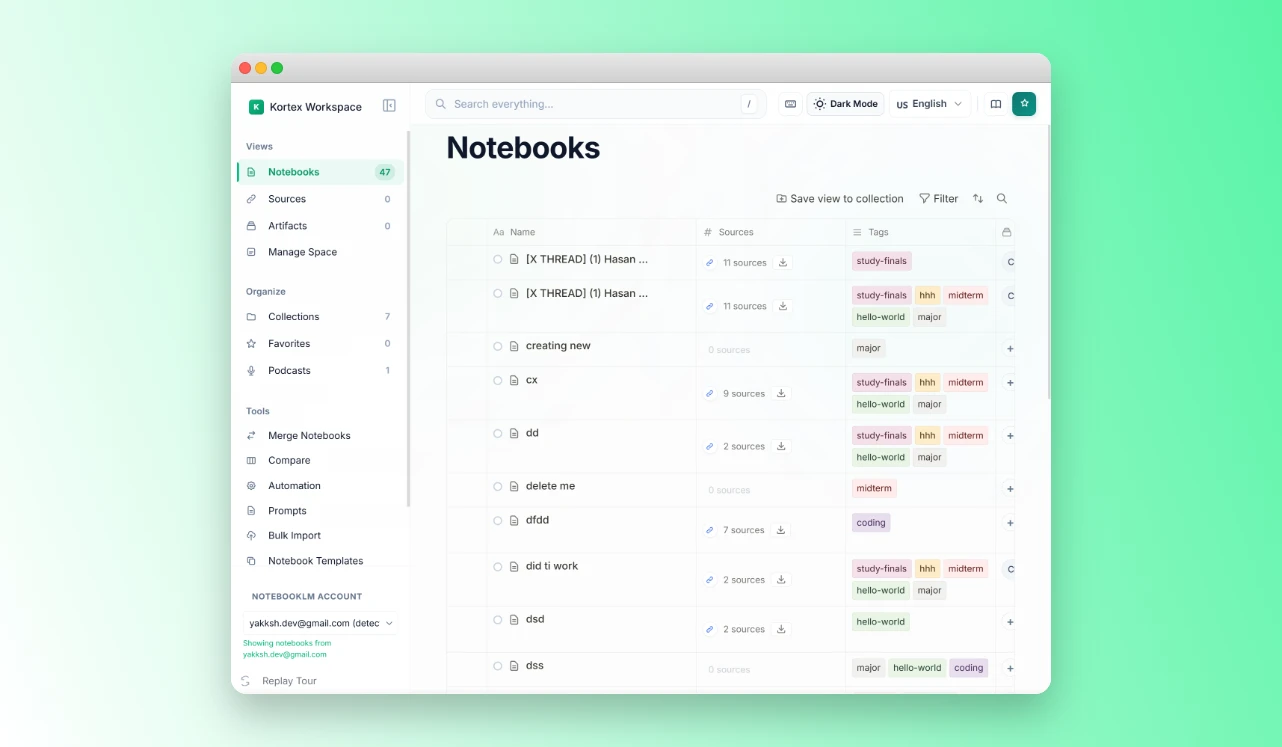
Kortex adds the missing pieces to the notebooks you already have: one-click export, collections and tags, a prompt library and automation rules. Free on Chrome.
 ---
## What can Kortex do?
Kortex adds four things Gemini Notebook doesn't have: export, import, automation and an organization layer. Each one fills a specific gap; in fact, together they add up. For example, with all four switched on, a notebook can get a briefing doc, a tag and a folder, and have its sources exported, with one tag from you.
### Export: get your research out
Export is the reason many people install Kortex. When we analyzed 776 Kortex MCP waitlist answers in September and October 2026, we found that 72 people asked to get their notes and outputs back out, and more than half had a manual workaround. Gemini Notebook itself sends single notes to Google Docs or Sheets and downloads flashcards as CSV, but it has no native export of sources or chats. Kortex, therefore, adds three kinds of export. One button above the sources panel saves every source in a notebook as PDF, Markdown, text or a ZIP. Another saves every note and artifact from the Studio panel at once, as PDF, Markdown or a ZIP. Chats export whole, or only the replies you tick, as Markdown, text, PDF or JSON, with or without your own questions. As a result, researchers can paste a briefing doc into Obsidian or Notion, and teams can share output without sharing the notebook. Notably, Kortex doesn't export to Word or Google Docs, and it doesn't build APA or MLA bibliographies.
---
## What can Kortex do?
Kortex adds four things Gemini Notebook doesn't have: export, import, automation and an organization layer. Each one fills a specific gap; in fact, together they add up. For example, with all four switched on, a notebook can get a briefing doc, a tag and a folder, and have its sources exported, with one tag from you.
### Export: get your research out
Export is the reason many people install Kortex. When we analyzed 776 Kortex MCP waitlist answers in September and October 2026, we found that 72 people asked to get their notes and outputs back out, and more than half had a manual workaround. Gemini Notebook itself sends single notes to Google Docs or Sheets and downloads flashcards as CSV, but it has no native export of sources or chats. Kortex, therefore, adds three kinds of export. One button above the sources panel saves every source in a notebook as PDF, Markdown, text or a ZIP. Another saves every note and artifact from the Studio panel at once, as PDF, Markdown or a ZIP. Chats export whole, or only the replies you tick, as Markdown, text, PDF or JSON, with or without your own questions. As a result, researchers can paste a briefing doc into Obsidian or Notion, and teams can share output without sharing the notebook. Notably, Kortex doesn't export to Word or Google Docs, and it doesn't build APA or MLA bibliographies.
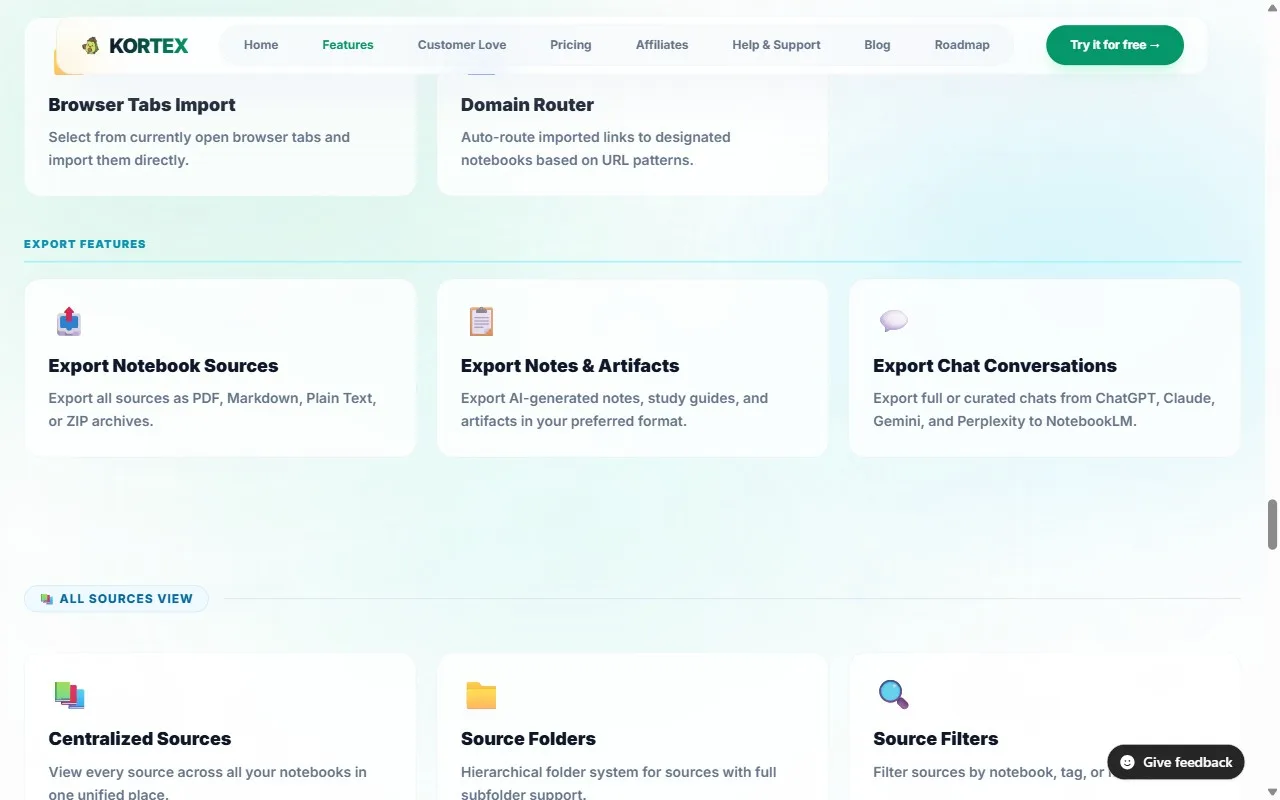 The free plan covers 10 of these one-click exports a day, enough to get your most important notebooks out this week.
Your Briefing Docs, chats and sources as Markdown or PDF
Kortex adds the export buttons Gemini Notebook leaves out, with citations kept in place, so a notebook leaves as one ZIP in a single click. Free on Chrome.
 ### Automation: rules that run on their own
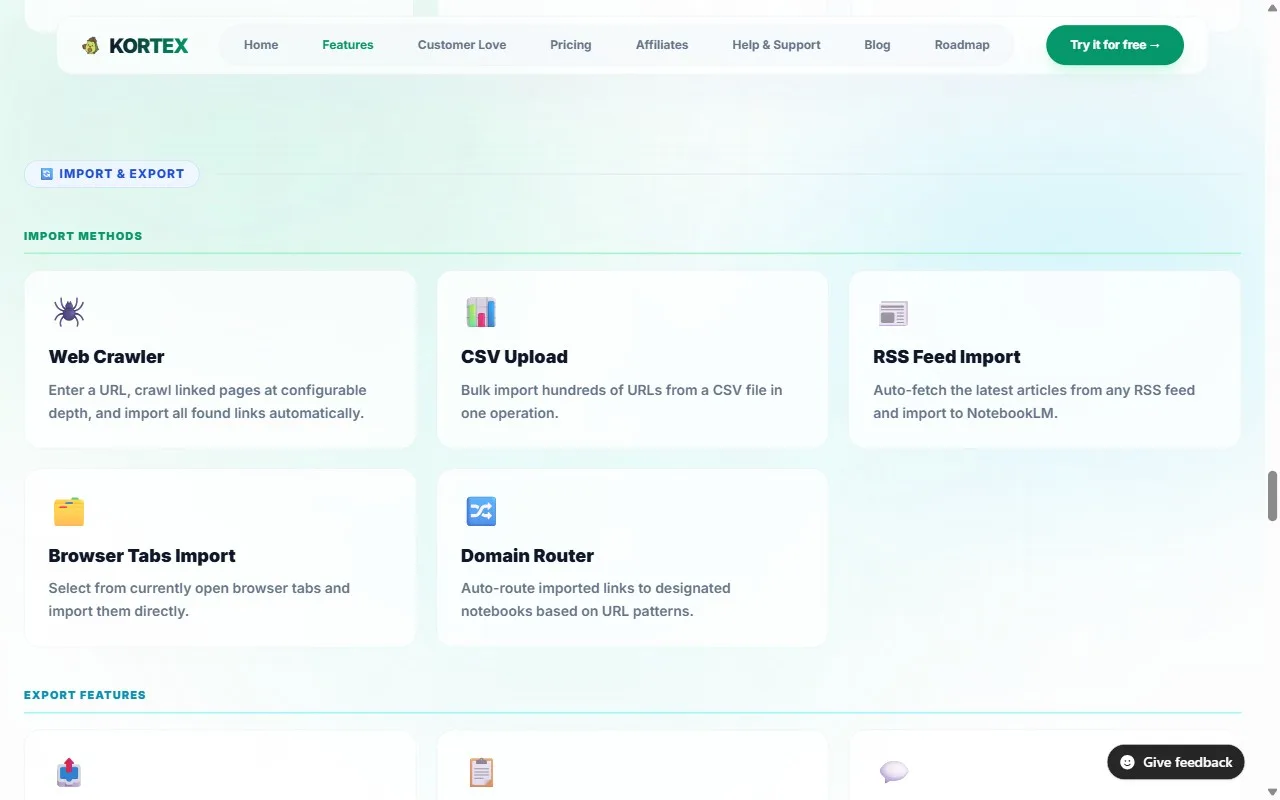
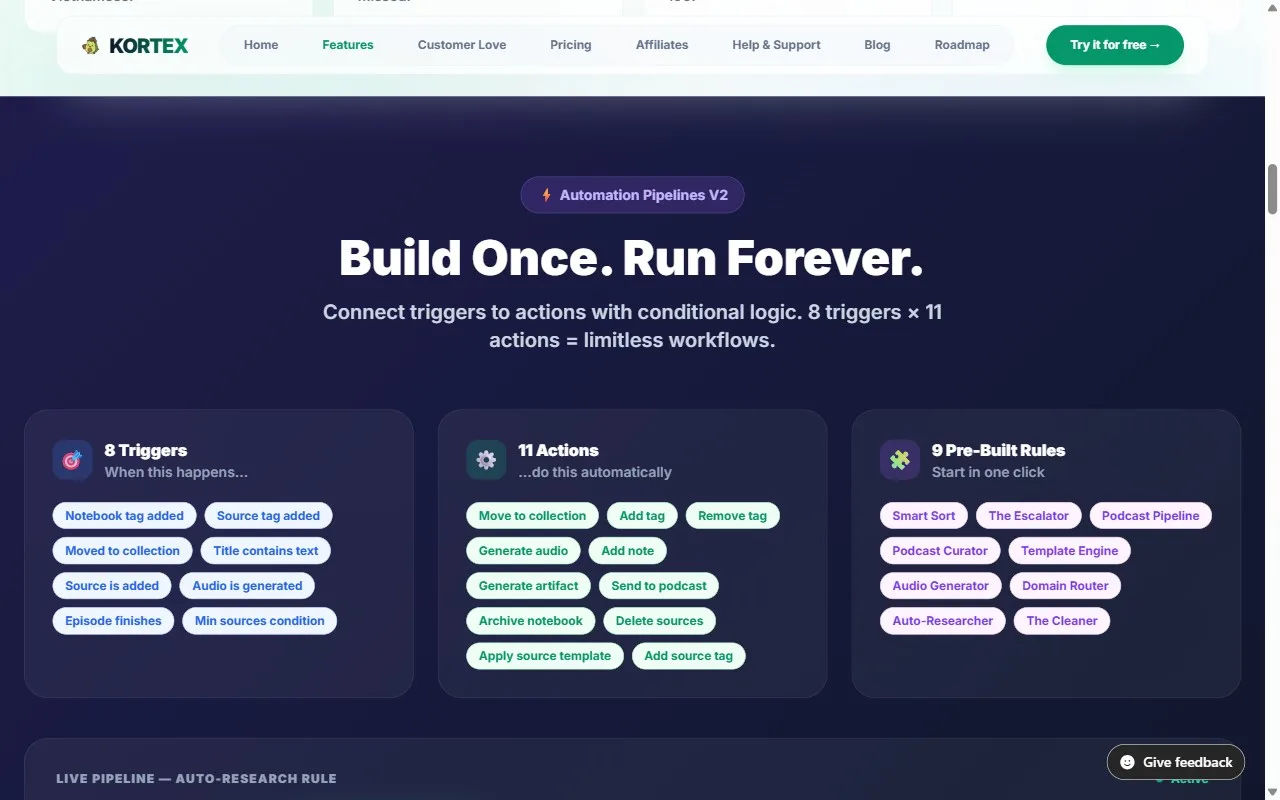
**Kortex automation** is a set of rules in the format "when this happens, do that," and it comes with Kortex Pro: 8 triggers, 11 actions and 9 ready-made rules. Rather than buttons you click, rules run in the background while you read. A trigger can be a tag, a move into a collection, a new source or a finished Audio Overview; an action can file the notebook, add a tag, generate an artifact or send audio to your podcast. The value, however, is in combinations. For instance, tag a notebook once, and it gets a briefing doc, lands in the right folder and sends its audio to your feed. Demand is real: in our waitlist survey, 128 of 776 people asked for work that runs on a schedule or trigger, the top request. For the best combinations, the guide to [10 Kortex automation workflows](/blog/kortex-automation-workflows) has exact trigger-and-action setups.
| Ready-made rule | What it does |
|---|---|
| **Auto-Researcher** | Tag `#to-summarize` and a briefing doc and flashcards start generating. |
| **Smart Sort** | Tag a notebook `#work` and it moves to the Work collection. |
| **Podcast Pipeline** | Notebooks filed in Daily Read add their audio to your podcast. |
| **Domain Router** | Links from a site you name, such as arxiv.org, go to one notebook. |
| **The Escalator** | Tag `#paper` and Kortex adds `#to-summarize` and `#cite` too. |
| **Template Engine** | File a notebook in a course folder and it gets the same starter notes. |
| **The Cleaner** | Finish an episode and it leaves the feed. |
### Automation: rules that run on their own
**Kortex automation** is a set of rules in the format "when this happens, do that," and it comes with Kortex Pro: 8 triggers, 11 actions and 9 ready-made rules. Rather than buttons you click, rules run in the background while you read. A trigger can be a tag, a move into a collection, a new source or a finished Audio Overview; an action can file the notebook, add a tag, generate an artifact or send audio to your podcast. The value, however, is in combinations. For instance, tag a notebook once, and it gets a briefing doc, lands in the right folder and sends its audio to your feed. Demand is real: in our waitlist survey, 128 of 776 people asked for work that runs on a schedule or trigger, the top request. For the best combinations, the guide to [10 Kortex automation workflows](/blog/kortex-automation-workflows) has exact trigger-and-action setups.
| Ready-made rule | What it does |
|---|---|
| **Auto-Researcher** | Tag `#to-summarize` and a briefing doc and flashcards start generating. |
| **Smart Sort** | Tag a notebook `#work` and it moves to the Work collection. |
| **Podcast Pipeline** | Notebooks filed in Daily Read add their audio to your podcast. |
| **Domain Router** | Links from a site you name, such as arxiv.org, go to one notebook. |
| **The Escalator** | Tag `#paper` and Kortex adds `#to-summarize` and `#cite` too. |
| **Template Engine** | File a notebook in a course folder and it gets the same starter notes. |
| **The Cleaner** | Finish an episode and it leaves the feed. |
 ### Audio: turn your notebooks into a podcast
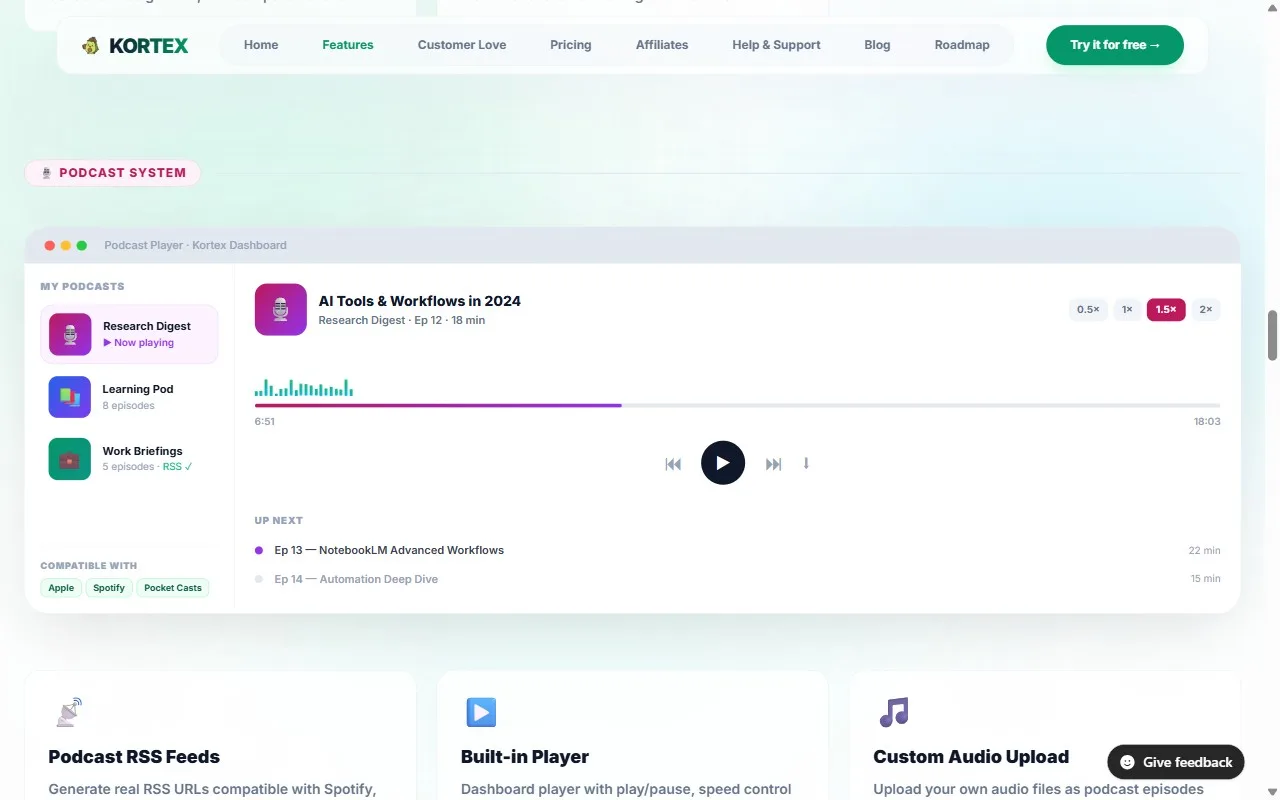
Gemini Notebook's Audio Overview turns your sources into a conversation between two AI hosts, in 80+ languages. It's handy, in particular, for taking in dense material on a commute or a walk. Kortex Pro makes it a listening habit:
- **Private RSS feed.** Each podcast has its own link for Spotify, Apple Podcasts, Pocket Casts or Overcast, with 1,000 minutes that never expire.
- **Built-in player.** Listen in the Workspace at 0.5x to 2x, skip 15 seconds and pick up where you stopped.
- **Collection to podcast.** Link a collection, and its new audio becomes episodes by itself.
### Audio: turn your notebooks into a podcast
Gemini Notebook's Audio Overview turns your sources into a conversation between two AI hosts, in 80+ languages. It's handy, in particular, for taking in dense material on a commute or a walk. Kortex Pro makes it a listening habit:
- **Private RSS feed.** Each podcast has its own link for Spotify, Apple Podcasts, Pocket Casts or Overcast, with 1,000 minutes that never expire.
- **Built-in player.** Listen in the Workspace at 0.5x to 2x, skip 15 seconds and pick up where you stopped.
- **Collection to podcast.** Link a collection, and its new audio becomes episodes by itself.
 ### Organization
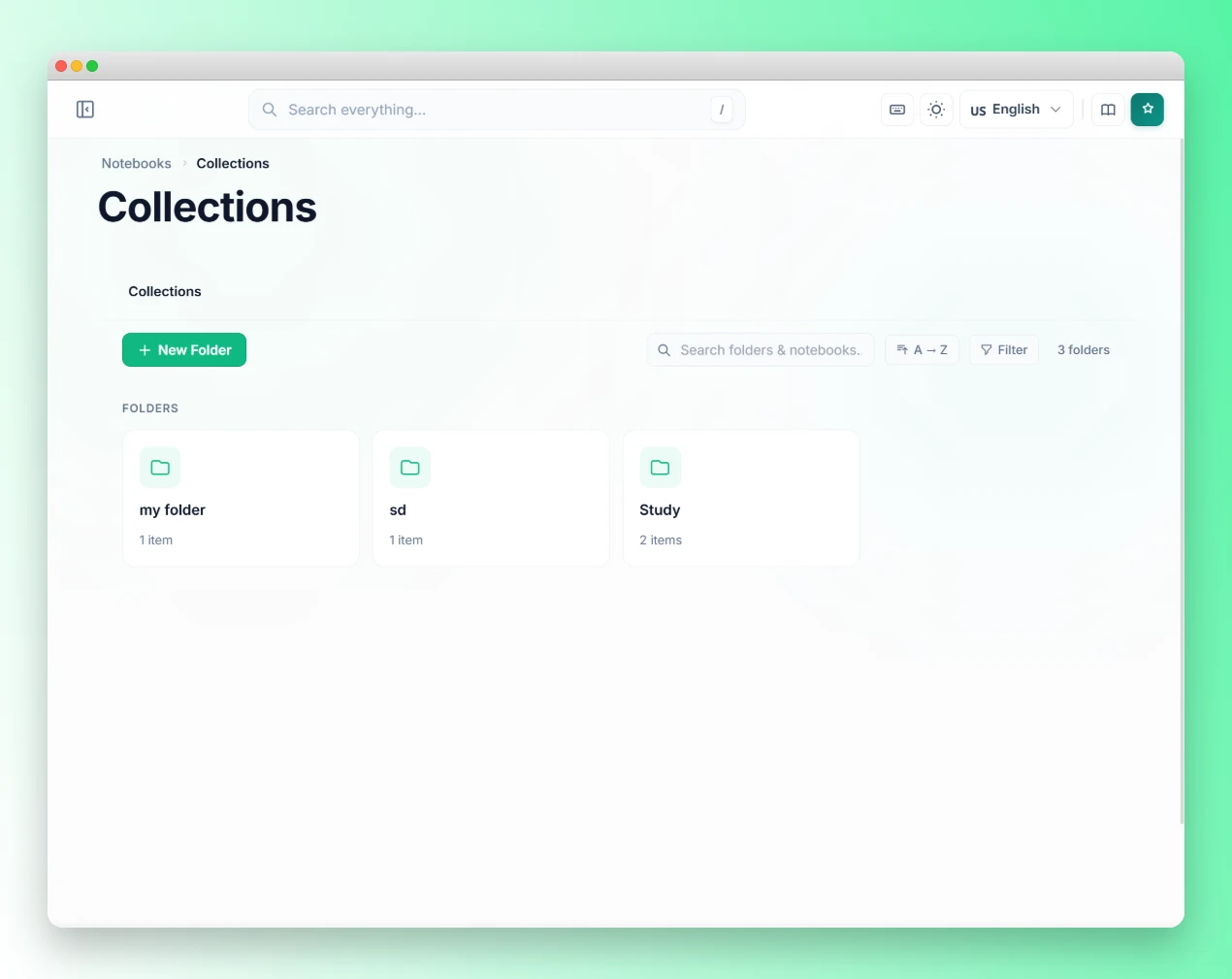
Heavy users, importantly, pile up notebooks fast. In our waitlist survey, 327 of 776 people (42%) keep more than 50 notebooks, and Gemini Notebook's free plan allows up to 100 ([Gemini Notebook Help](https://support.google.com/gemininotebook/answer/16213268?hl=en), 2026). Kortex adds an organization layer:
- **Collections.** Folders for notebooks, with subfolders, colors and pinning.
- **Tags.** Colored tags for notebooks, plus smart collections that fill themselves from tag rules.
- **Search everything.** One box looks through notebooks, sources, notes, artifacts, collections and tags.
- **Prompt library.** Save, sort and insert your best prompts with one click.
- **Source views.** Save a filtered list of sources, such as only PDFs, and switch back in one click.
For a naming, tagging and folder system that scales past 100 notebooks, the guide to [organizing 50+ Gemini Notebooks](/blog/organize-notebooklm-notebooks) lays out a three-tier approach.
### Organization
Heavy users, importantly, pile up notebooks fast. In our waitlist survey, 327 of 776 people (42%) keep more than 50 notebooks, and Gemini Notebook's free plan allows up to 100 ([Gemini Notebook Help](https://support.google.com/gemininotebook/answer/16213268?hl=en), 2026). Kortex adds an organization layer:
- **Collections.** Folders for notebooks, with subfolders, colors and pinning.
- **Tags.** Colored tags for notebooks, plus smart collections that fill themselves from tag rules.
- **Search everything.** One box looks through notebooks, sources, notes, artifacts, collections and tags.
- **Prompt library.** Save, sort and insert your best prompts with one click.
- **Source views.** Save a filtered list of sources, such as only PDFs, and switch back in one click.
For a naming, tagging and folder system that scales past 100 notebooks, the guide to [organizing 50+ Gemini Notebooks](/blog/organize-notebooklm-notebooks) lays out a three-tier approach.
 ---
## How do you install the Kortex extension?
Setup takes about three minutes; specifically, three steps. Here's the exact sequence.
**Step 1: Install.** [Add Kortex to Chrome](https://chromewebstore.google.com/detail/kortex-notebooklm/hdapplggdhndkblofffknpmnnnnbncbn) (it also works in Edge and Brave). It installs in under a minute and switches on at `notebook.google.com`, and at the old `notebooklm.google.com` address too.
**Step 2: Sign in.** Click the Kortex icon in your toolbar and sign in with your Google account. That starts your free plan.
**Step 3: Export your first notebook.** Open any notebook. New buttons appear above the sources panel. Click the download button to save everything as a ZIP, or pick PDF, Markdown or plain text.
### First week setup checklist
Once export works, these five steps get you set up within your first week:
1. **Save 3 prompts to the prompt library.** Paste in your most-used research questions and name each one. Every prompt is then one click away.
2. **Turn on Auto-Researcher (Pro).** Tag a notebook `#to-summarize` and a briefing doc and flashcards start generating.
3. **Create 3 or 4 collections.** Think about how you really sort work: by project, client, topic or status. Then, similarly, file your existing notebooks.
4. **Tag your 5 most active notebooks.** Give each a status tag (`#active`, `#reference` or `#archive`) and a type tag (`#research`, `#client`, `#personal`).
5. **Try highlight and send once.** On your next browsing session, select a passage, right-click and send it to a notebook.
---
## Is Kortex free, and what does Pro cost?
Kortex is free to start, with no credit card needed. The free plan's 10 daily exports and 10 daily imports cover most single research sessions, and it includes 10 saved prompts, 5 source views and 5 folders. People who export often, want automations or need unlimited folders move to Pro, at $9.99 a month or $4.92 a month billed yearly. Additionally, Pro adds sync across devices, a podcast feed with 1,000 minutes, Google Docs sync and bulk import. Kortex doesn't cap Gemini Notebook's AI features; instead, they follow your Google plan, so the limits come from Google, not us. Meanwhile, Google changed how those limits work this year. Since September 2, 2026, Gemini Notebook usage refreshes every five hours up to a weekly cap, with Google AI Plus at two times and AI Pro at four times the standard limit ([Gemini Notebook Help](https://support.google.com/gemininotebook/answer/17670842?hl=en), 2026). Is it worth paying? Consider your library size. In our survey, the share of people already on Pro rose from 21% of those with 1 to 10 notebooks to 65% of those with more than 200.
Pro also includes Kortex MCP. **Kortex MCP** is a connector that lets Claude, ChatGPT or Cursor work inside your notebooks. It's a private beta for invited Kortex Pro members, with invites sent from the [Kortex MCP waitlist](https://forms.gle/1KeSLTxQHdSwpjPV9). To see what it does, read how to [ask your notebooks from Claude or ChatGPT and get cited answers](/blog/gemini-notebook-in-claude).
---
## What's on the Kortex roadmap?
Kortex ships new features often, and the roadmap is public; thus you can see what's next. See what's planned on the public [Kortex roadmap](/roadmap), and find step-by-step help in the [Kortex documentation](/docs). When we analyzed 1,451 Google autocomplete suggestions in October 2026, "kortex notebooklm firefox" and "kortex notebooklm safari" both showed up, so those browsers are clearly on people's minds; for now, Kortex runs on Chrome and other Chromium browsers.
The quickest way to judge Kortex is on your own notebooks: install it, export one notebook, and try Auto-Researcher before your next research session.
---
## How do you install the Kortex extension?
Setup takes about three minutes; specifically, three steps. Here's the exact sequence.
**Step 1: Install.** [Add Kortex to Chrome](https://chromewebstore.google.com/detail/kortex-notebooklm/hdapplggdhndkblofffknpmnnnnbncbn) (it also works in Edge and Brave). It installs in under a minute and switches on at `notebook.google.com`, and at the old `notebooklm.google.com` address too.
**Step 2: Sign in.** Click the Kortex icon in your toolbar and sign in with your Google account. That starts your free plan.
**Step 3: Export your first notebook.** Open any notebook. New buttons appear above the sources panel. Click the download button to save everything as a ZIP, or pick PDF, Markdown or plain text.
### First week setup checklist
Once export works, these five steps get you set up within your first week:
1. **Save 3 prompts to the prompt library.** Paste in your most-used research questions and name each one. Every prompt is then one click away.
2. **Turn on Auto-Researcher (Pro).** Tag a notebook `#to-summarize` and a briefing doc and flashcards start generating.
3. **Create 3 or 4 collections.** Think about how you really sort work: by project, client, topic or status. Then, similarly, file your existing notebooks.
4. **Tag your 5 most active notebooks.** Give each a status tag (`#active`, `#reference` or `#archive`) and a type tag (`#research`, `#client`, `#personal`).
5. **Try highlight and send once.** On your next browsing session, select a passage, right-click and send it to a notebook.
---
## Is Kortex free, and what does Pro cost?
Kortex is free to start, with no credit card needed. The free plan's 10 daily exports and 10 daily imports cover most single research sessions, and it includes 10 saved prompts, 5 source views and 5 folders. People who export often, want automations or need unlimited folders move to Pro, at $9.99 a month or $4.92 a month billed yearly. Additionally, Pro adds sync across devices, a podcast feed with 1,000 minutes, Google Docs sync and bulk import. Kortex doesn't cap Gemini Notebook's AI features; instead, they follow your Google plan, so the limits come from Google, not us. Meanwhile, Google changed how those limits work this year. Since September 2, 2026, Gemini Notebook usage refreshes every five hours up to a weekly cap, with Google AI Plus at two times and AI Pro at four times the standard limit ([Gemini Notebook Help](https://support.google.com/gemininotebook/answer/17670842?hl=en), 2026). Is it worth paying? Consider your library size. In our survey, the share of people already on Pro rose from 21% of those with 1 to 10 notebooks to 65% of those with more than 200.
Pro also includes Kortex MCP. **Kortex MCP** is a connector that lets Claude, ChatGPT or Cursor work inside your notebooks. It's a private beta for invited Kortex Pro members, with invites sent from the [Kortex MCP waitlist](https://forms.gle/1KeSLTxQHdSwpjPV9). To see what it does, read how to [ask your notebooks from Claude or ChatGPT and get cited answers](/blog/gemini-notebook-in-claude).
---
## What's on the Kortex roadmap?
Kortex ships new features often, and the roadmap is public; thus you can see what's next. See what's planned on the public [Kortex roadmap](/roadmap), and find step-by-step help in the [Kortex documentation](/docs). When we analyzed 1,451 Google autocomplete suggestions in October 2026, "kortex notebooklm firefox" and "kortex notebooklm safari" both showed up, so those browsers are clearly on people's minds; for now, Kortex runs on Chrome and other Chromium browsers.
The quickest way to judge Kortex is on your own notebooks: install it, export one notebook, and try Auto-Researcher before your next research session.
Get your research out of Gemini Notebook today
Install Kortex, export any notebook in one click, and let Auto-Researcher write a Briefing Doc for every notebook you tag. Free on Chrome.