# Save Facts About You for Your AI Chats
Memory is a short list of facts about you and your work in the Kortex chat Library. Every fact is one you wrote or approved. A new AI chat starts from zero, so Memory gives you facts to hand an AI, like a card file it can read.
 ## Why use Memory?
- Every new chat starts from zero. Memory lets you hand an AI the facts it should know.
- Nothing is added without you. Every fact is one you wrote or chose.
## Where each fact came from
Each fact shows where it came from. **You said** means you typed it in. **From a chat** shows the chat's name, and links to the message the fact came from. A small mark shows which AI the chat was on.
## How to add a fact
1. Click **Memory** in the Library's left column.
1. Click **Add a fact**.
1. Type a short fact. It can be up to 300 characters. For example: _Prefers British spelling in anything I write._
1. Click **Save**.
 ## How to remember something from a chat
1. On an AI site, select a sentence in an answer.
1. In the small bar that appears, click **Remember**.
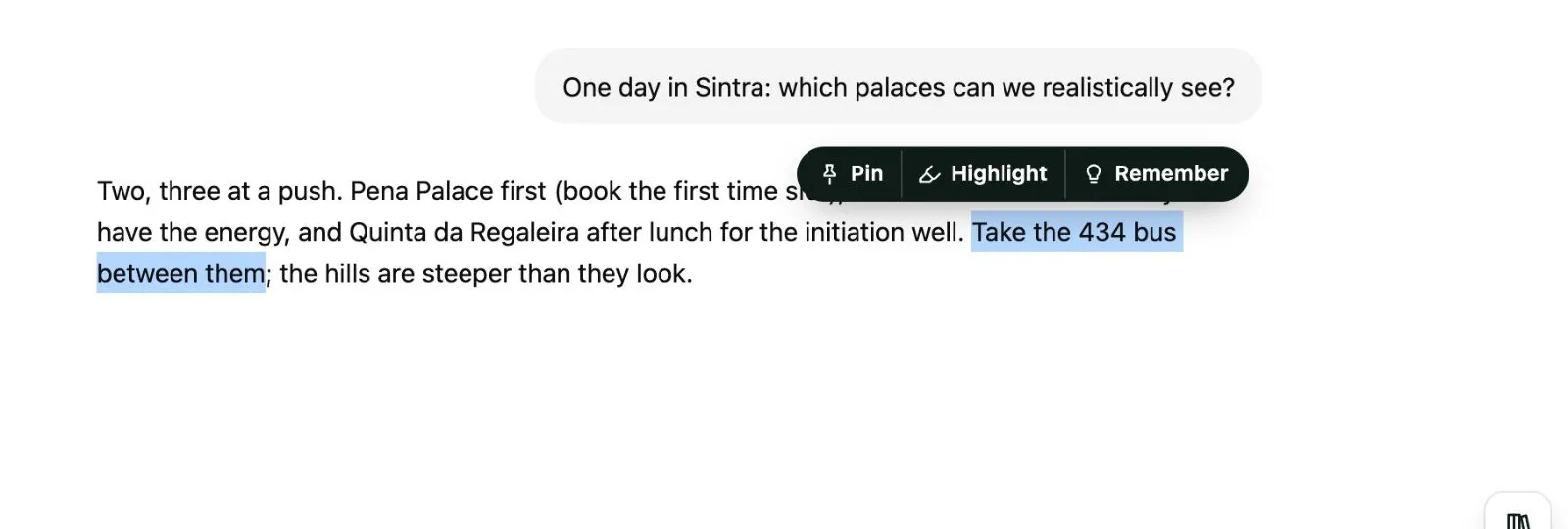 When the new fact looks like one you already have, Kortex asks. **Update it** changes the old fact. **Keep both** keeps two.
 ## How to edit a fact, or mark it no longer true
Open a fact's ⋯ menu. It can edit the fact, mark it no longer true, copy it, open the chat it came from, or delete it.
 - **No longer true** keeps the fact with an end date instead of deleting it. Kortex stops using it.
- **True again** undoes that.
Use the menu at the top left to show **True now**, **No longer true** or **All facts**.
## Using your facts
Click **Copy as an about-me pack** to copy your facts as a short brief. Or type `;me` in any AI's chat box. You read and edit the pack before it goes in. See [Moving context between AIs](/docs/library-moving-context). Memory facts are also available to an assistant over [MCP](/docs/library-mcp).
:::tip Good to know
- Facts stay on this computer. The free plan keeps 25 facts. Pro has no limit. See [the free plan and the trial](/docs/chat-library#on-the-free-plan-and-the-trial).
- A fact leaves your computer only when you send it, such as in an about-me pack. See [Privacy](/docs/library-privacy).
:::