# Gemini Notebook (formerly NotebookLM) for Writing a Book or Thesis
> How to use NotebookLM for writing a book, thesis or paper: the notebook holds your research and checks your draft, while you or Claude write the prose.
By Juli · Published Nov 24, 2026 · Updated Nov 25, 2026 · https://www.kortex-notebooklm.com/blog/gemini-notebook-for-writing
Gemini Notebook (formerly NotebookLM) is good for writing when you give it the right job: holding your evidence, answering from it with citations, and checking your draft against it. For a long draft, keep control of the structure and voice in your editor. Use it for writing a book, a thesis or a paper as the research desk beside your editor, and let yourself (or an assistant like Claude) do the prose.
That split is the whole method. This guide shows how to set up a notebook for a novel, a thesis chapter or a paper, and the prompts that pull evidence out. It covers the check that catches a wrong claim before a reader does. It also shows how Claude or ChatGPT can draft from your notebook without losing the citations.
> **Key Takeaways**
> - Gemini Notebook supports questions about selected sources with citations you can check for evidence and continuity work (Gemini Notebook Help, 2026).
> - Author Steven Johnson kept about 7,000 research quotes in one notebook and drafted his book in Google Docs (Google Workspace, 2024).
> - Footnotes and comments in Google files are not imported, so thesis writers should move notes into the text.
> - 91 of 776 Kortex MCP waitlist respondents asked their AI assistant to draft writing from their notebook sources (Kortex waitlist survey, 2026).
## Is Gemini Notebook good for writing?
Yes, for the research half of writing. **Gemini Notebook** is Google's AI notebook that answers questions from the sources you add, such as PDFs, Google Docs and web pages. Google's help center says chat responses "only use data from your sources" and that the notebook uses "direct quotes, text, and images from your sources as citations" ([Gemini Notebook Help](https://support.google.com/gemininotebook/answer/16179559?hl=en), 2026). Google also documents experimental chat actions for web research and document creation. Ask it to separate those outputs from claims supported by your manuscript, and check the citations.
The best-known example is Steven Johnson, a bestselling author who worked on the product at Google. For his book *The Infernal Machine*, he kept about 7,000 quotes from his research in one notebook and drafted the book in Google Docs, with one Docs tab per chapter ([Google Workspace](https://workspace.google.com/blog/ai-and-machine-learning/interview-steven-johnson-latest-book-google-docs-and-notebooklm), 2024). He asked it questions like the name of a restaurant where two of his subjects met. The notebook found; Johnson wrote.
On Google's blog, Johnson said people use it "for assistance with writing fantasy and sci-fi novels", and game designers use it for "world building and intricate backstories" ([Google](https://blog.google/innovation-and-ai/products/notebooklm-beginner-tips/), 2024). Here's how the jobs split:
| Writing job | Gemini Notebook | Better somewhere else |
|---|---|---|
| Find a quote, fact or scene in your material | Strong: cited answers | |
| Continuity: names, dates, who knows what | Strong: ask across every chapter | |
| Evidence tables for a literature review | Strong: tables from selected sources | |
| Outline from your notes | Good: reports and chat | |
| Check a draft against sources | Strong: add the draft as a source | |
| Write a 5,000-word chapter in your voice | Can generate drafts; length and quality need review | Keep the master draft in your editor |
| Line editing and formatting | Not built for it | Google Docs, Word, Scrivener |
| Facts that aren't in your sources | Web research may find candidates; verify them | Your research, then add approved sources |
## Can Gemini Notebook write the draft for you?
It can generate drafts and documents. For a book or thesis, work section by section and review the evidence, structure and voice yourself. Studio's Reports offer a briefing document, study guide, FAQ, AI-suggested formats, or "Create your own" ([Gemini Notebook Help](https://support.google.com/gemininotebook/answer/16206563?hl=en), 2026), and a good custom prompt gets you a usable first pass of a short piece. Chat answers can be saved with **Save to note**. Notes export to a new Google Doc, but edits there "will not synchronize" back to the notebook ([Gemini Notebook Help](https://support.google.com/gemininotebook/answer/16262519?hl=en), 2026).
The limits show up fast on anything long:
- **Evidence and generated prose differ.** A chapter needs transitions, argument and voice; ask it to label suggestions separately from source-backed claims.
- **Saved answers are awkward to edit.** Google says saved response notes "are editable once citations are removed", so tidying a draft in place costs you the citations.
- **It still makes mistakes.** Google's own wording: "Gemini Notebook can make mistakes" ([Gemini Notebook Help](https://support.google.com/gemininotebook/answer/16164461?hl=en), 2026). Our guide on [whether Gemini Notebook hallucinates](/blog/does-gemini-notebook-hallucinate) covers where that happens.
There's a human reason to keep the drafting, too. In a 2025 preprint, essay writers who used an AI assistant reported the lowest sense of ownership over their essays, and had trouble quoting what they had just written ([Kosmyna et al., arXiv](https://arxiv.org/abs/2506.08872), 2025). If the book or thesis has your name on it, the sentences should be yours.
So the workable setup is two lanes: the notebook holds and checks the evidence, and the draft lives in your editor or your assistant. If you write in Google Docs on Google AI Pro or Ultra, Google closes part of that gap. Type **@** in Gemini in Docs, pick your notebook, and Gemini will "ground its output in your sources and provide inline citations" ([Google Workspace Updates](https://workspaceupdates.googleblog.com/2026/09/ground-ai-prompts-in-google-docs-on-existing-sources-from-Gemini-Notebook.html), 2026). That suits a section at a time, inside the document you're already writing.
The annoying part is the gap everywhere else. If you draft in Claude or ChatGPT, you ask the notebook, copy the answer across, and the citations fall off on the way.
Draft in Claude without losing the citations
Kortex MCP lets Claude or ChatGPT ask your notebooks directly and write from the cited answers, so the evidence stays attached to every paragraph. It's included with Kortex Pro and Lifetime.
## What does a writing workflow with Gemini Notebook look like?
It's a four-step loop you repeat per chapter: collect, ask, draft, check. Two steps happen in the notebook, one in your editor or assistant, and the last one sends the draft back into the notebook to be tested.
The notebook collects, answers and checks; the prose happens in your editor or assistant. Kortex's method, built on features documented in Gemini Notebook Help, 2026.
Before you start, know the container. A free notebook holds 50 sources and Google AI Pro raises that to 300 ([Gemini Notebook Help](https://support.google.com/gemininotebook/answer/16213268?hl=en), 2026). Each source can run to "500,000 words per source or up to 200MB for local uploads" ([Gemini Notebook Help](https://support.google.com/gemininotebook/answer/16269187?hl=en), 2026). A whole novel manuscript fits in one source; a thesis with 200 papers needs several notebooks.
## How do you use Gemini Notebook for writing a book?
Build a story bible notebook and treat it as the memory of the book. **A story bible** is the reference file a series writer keeps on characters, places and rules; here it becomes one notebook. Add one source each for character sheets, the timeline, the setting and its rules, a glossary of names, and your style notes, plus every finished chapter. Google Docs, Word files, Markdown, PDF and ePub are all accepted source types ([Gemini Notebook Help](https://support.google.com/gemininotebook/answer/16215270?hl=en), 2026).
Then ask it the questions a continuity editor would. Google's own example from its tips is "Remind me which characters live where?" (Google, 2024). A few more that earn their keep:
```
Where does Mara first learn about the map? Quote the passage and name the chapter.
```
```
Build a timeline of every scene in chapters 1 to 12 with the day it happens. Flag any two scenes that can't both be true.
```
```
Using only the character sheet and chapters 1 to 9, what does Ellis know about the fire by the end of chapter 9? Cite each point.
```
Three habits keep it accurate:
- **Keep chapters as Google Docs if you write in Docs.** Google says sources imported from Drive "are auto-updated and will sync every few minutes", and you can force it with **Click to sync with Google Drive** (Gemini Notebook Help, 2026). With many chapters, Kortex's **Sync Google Docs** button re-syncs every Google Doc source in the notebook at once.
- **Untick old drafts.** Select only the sources that should answer, or the notebook will quote the version you cut.
- **Use it for creative prompts sparingly.** Chat's Custom style can take a role, and Google's own example is "Pretend to be a role-playing game host" (Gemini Notebook Help, 2026). A character interview grounded in your sheets is a good way to hear a voice. It won't invent plot beyond your notes, which is often the useful part.
## How do you use Gemini Notebook for a thesis or research paper?
Give each chapter its own notebook. A thesis chapter rarely needs more than a few dozen core papers, each notebook stays under the source cap, and answers don't drift into another chapter's literature. If your papers live in a reference manager, our [Zotero and Gemini Notebook guide](/blog/gemini-notebook-zotero) covers moving a collection across.
Next, ask for structure instead of prose. For example, an [evidence table prompt](/prompts/evidence-table) turns twenty papers into one table of claims, methods and findings with a citation per cell, which is the raw material of a literature review. For the reading itself, the companion guide on [how to read research papers with AI](/blog/read-research-papers-with-ai) has a three-pass method.
One trap catches thesis writers: Google's help on sources says footnotes and comments in Google files are not imported (Gemini Notebook Help, 2026). If your argument lives in footnotes or margin comments, move it into the body text or a separate source before you ask about it.
Then check the draft. Add your chapter as its own source, select it with the papers, and run a [fact-check prompt](/prompts/fact-check-draft) that marks each claim supported, contradicted or not found, with the passage. That is the step that catches a number you misremembered from a paper you read six months ago.
Finally, check the rules. The ICMJE recommendations, which many medical journals follow, say chatbots "should not be listed as authors". Authors should describe AI use in the cover letter and the submitted work, and "humans are responsible for any submitted material" made with AI ([ICMJE](https://www.icmje.org/recommendations/browse/artificial-intelligence/ai-use-by-authors.html), 2026). Universities set their own policies, so read yours. Our sibling guide on [how to use AI for research](/blog/how-to-use-ai-for-research) covers what to delegate and what to keep.
## How can Claude or ChatGPT draft from your notebook?
Connect them with Kortex MCP, and your assistant can ask the notebook itself instead of waiting for you to paste. Gemini Notebook has no public consumer API, so Claude and ChatGPT can't reach your notebooks on their own. **Kortex MCP** is a bridge between your AI assistant and your notebooks. Your assistant calls Kortex, and the Kortex extension in your Chrome asks Gemini Notebook with your own Google session. The answer comes back with its citations (Kortex MCP docs, 2026). Setup is one URL; our [guide to connecting Gemini Notebook to Claude and ChatGPT](/blog/gemini-notebook-in-claude) has the steps.
This is a common ask. When we analyzed the 776 answers to the Kortex MCP waitlist survey (Sep 19 to Oct 1, 2026), 91 people asked their assistant to draft writing from their notebook sources. One wanted "fact-checked first drafts for market updates, newsletters and LinkedIn content based on approved source material".
People asking for each job, out of 776 (one person could ask for several); the eight most requested of 21. Source: Kortex MCP waitlist survey, Sep 19 to Oct 1, 2026.
Here's the recipe. Kortex's `ask_question` tool returns an answer, its citations and a session id, and `ask_library` asks up to three notebooks at once with each answer kept separate (Kortex tools docs, 2026). So a drafting prompt in Claude can look like this:
```
Ask my "Chapter 3: Methods" notebook what the five studies say about sample size and recruitment, with citations. Then draft a 400-word methods-comparison section from those answers only. Keep a [n] citation after every factual sentence, and mark anything that is your own wording rather than a notebook claim as [my note].
```
Claude writes the connective prose, the notebook supplies every fact, and each sentence that makes a claim carries its citation. For a novel, swap in your story bible: "Ask my story bible what Mara knows about the fire, then draft the scene where she confronts Ellis, keeping every fact consistent with the answers."
When the section is done, `save_chat_to_note` saves the latest answer and its citations back into the notebook as a note, so the next chapter can build on it. That tool writes to your notebook, so a read-only key can't use it. Two catches: Chrome must be open with Kortex signed in, and the first call after Chrome has been idle can take up to 30 seconds.
Let Claude draft from your notebook, with sources
Kortex MCP connects Claude or ChatGPT to your Gemini Notebook, so every paragraph your assistant drafts can point back to the passage behind it. Included with Kortex Pro and Lifetime.
## How do you get your writing out of Gemini Notebook?
Natively, one note at a time. Google's **Export to Docs** puts a note into a new Google Doc, and reports export the same way from their three-dots menu (Gemini Notebook Help, 2026). There's no native export of chats or sources.
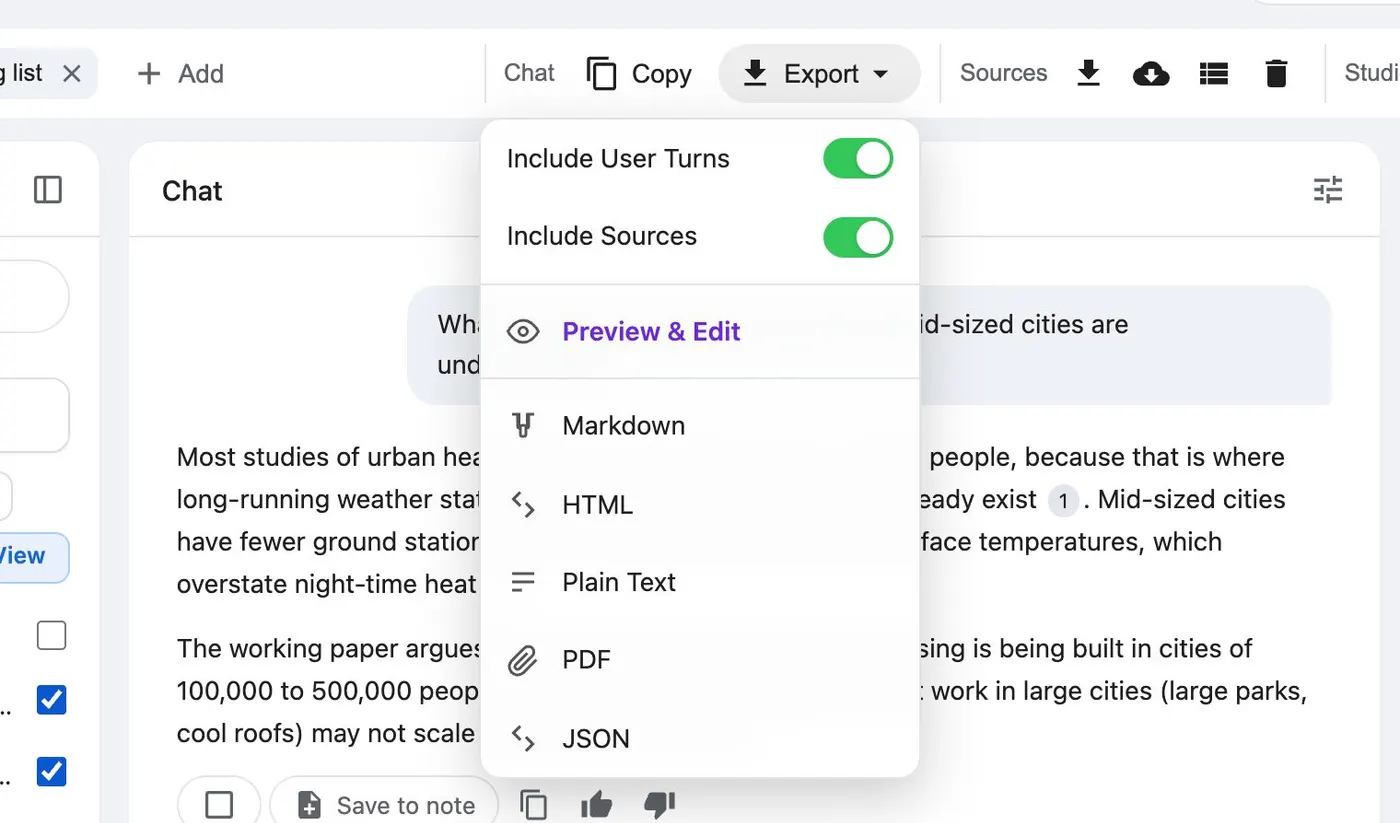
Kortex fills the gaps from a bar it adds under each notebook's title.
Kortex's Export menu on a Gemini Notebook chat: pick what goes in, then the format.
**Export** saves the chat as Markdown, HTML, plain text, PDF or JSON, and you can tick only the answers you want. **Download sources** exports sources as Markdown, plain text or PDF, and **Export Studio outputs** downloads Studio documents and notes as Markdown, text or PDF. Markdown keeps headings and lists, so it drops straight into Obsidian, Notion or a code repository. Kortex has no Word or Google Docs export, so for a Doc, use Google's own button. The [Gemini Notebook export guide](/blog/export-gemini-notebook) walks through each format.
## What are the limits of Gemini Notebook for writers?
The main limit is that it won't do your thinking, which is mostly a feature. The rest are practical:
- **Generated prose needs editing.** Keep the master draft in your editor and check its voice, argument and source support.
- **Source caps.** 50 sources per notebook on the free plan, so long projects need one notebook per chapter or part.
- **Lost footnotes and comments** from Google files, as covered above.
- **Old drafts answer too.** Untick superseded versions, or the notebook may quote text you already cut.
- **Privacy for unpublished work.** Google says your data "is not used to train Gemini Notebook unless you provide feedback" (Gemini Notebook Help, 2026). Rating an answer can send that interaction, uploads included, for review. For instance, a thumbs-down on a chapter summary is feedback, so skip it for work you haven't published.
Use Gemini Notebook as a research desk, with a free plan to start. Put the evidence in it, keep the prose in your hands or your assistant's, and run every draft back through it before anyone else reads it.
Write in Claude, with your notebook as the evidence
Connect Claude or ChatGPT to Gemini Notebook and draft from cited answers instead of copied ones. Kortex MCP is included with Kortex Pro and Lifetime, and Kortex itself is free on Chrome.
## Frequently asked questions
### Is NotebookLM good for writing a book?
Yes, as a research and continuity tool rather than a ghostwriter. Load your character sheets, timeline, style guide and finished chapters, then ask it where a detail first appears or whether two scenes contradict each other. Ask for citations and check each passage. Write the chapters yourself in Google Docs or your usual editor.
### Can NotebookLM write essays or papers for me?
It can draft short pieces. Reports include a Create your own option, and chat answers can be saved as notes and exported to Google Docs. Ask it to separate evidence from suggestions, and verify any argument or wording it generates. Use it for evidence and outlines, and check the journal or university rules on AI disclosure.
### How do I use NotebookLM for my thesis?
Make one notebook per chapter so each stays under the source cap and answers stay on topic. Ask for evidence tables and the exact quotes behind each point, write the chapter yourself, then add your draft as a source and check every claim against the papers before you hand it in.
### Can NotebookLM read my Google Docs manuscript?
Yes. Google Docs are a supported source type, and Google says sources imported from Drive sync every few minutes. Footnotes and comments in Google files are not imported, so paste any notes that matter into the text or a separate source. Each source can hold up to 500,000 words.
### Can Claude or ChatGPT write from my NotebookLM notebooks?
Yes, with Kortex MCP. Your assistant asks a notebook through Kortex, gets the answer with its citations, and drafts in the chat with the sources attached. It can save the result back as a notebook note. Kortex MCP is included with Kortex Pro and Lifetime, and Chrome must be open.
### Does Google train its AI on my manuscript?
Google's help center says your data is not used to train Gemini Notebook unless you provide feedback. If you rate an answer, Google may review the full context of that interaction, including your uploads. For unpublished work, the safe habit is simple: don't send feedback on chats about it.
---
*Editorial note: fact-checked against the official help pages and docs linked above on November 25, 2026. Spotted something out of date? [Contact us](/support) and we will fix it, or read more [about Kortex](/about).*